
Disclosure: KY IPTV sells its own IPTV service, and KY IPTV and Bunny Streams share common ownership. Everything below comes from Bunny Streams’s own website, read on October 11, 2026; no streaming tests were run.
This bunny streams review finds a service listing subscription plans, device options, and payment methods for cord-cutters. The site claims 25,000+ live channels and 100,000+ movies and shows; this review checks its published terms, not streaming performance.
Compare the listed connection terms and devices with your setup, then compare KY IPTV’s plans and device options before choosing.
Bunny Streams at a glance
This Bunny Streams review looks at what the service lists on its website. Bunny Streams claims more than 25,000 live channels and 100,000 movies and shows. Its listed regions include the USA, UK, Canada, Europe, Asia, and MENA. Those regional listings may interest you if you’re comparing live TV and on-demand access across devices you already own. Treat these as website claims, not a report of streaming tests.
Quick tip: Before comparing subscriptions, decide whether one connection suits your household or whether you expect to need add-on connections.
What’s included with Bunny Streams
Bunny Streams lists Smart TVs, Android, iOS, Firestick, Android boxes, MAG devices, and PC. IPTV Smarters is its listed app; other app details are not listed on its website.
The site publishes 4K, HD, Full HD, FHD, and 4K Ultra HD quality labels. These are published claims; the site does not specify which content uses each label.
The site lists EPG / TV Guide and says its EPG is updated; catch-up details are not listed. It attributes anti-freeze technology, a global CDN, Predictive Content Prefetch, and “Server Stability 99%” to its service. These are website claims, not independent test results.
How much does Bunny Streams cost? Plans and prices
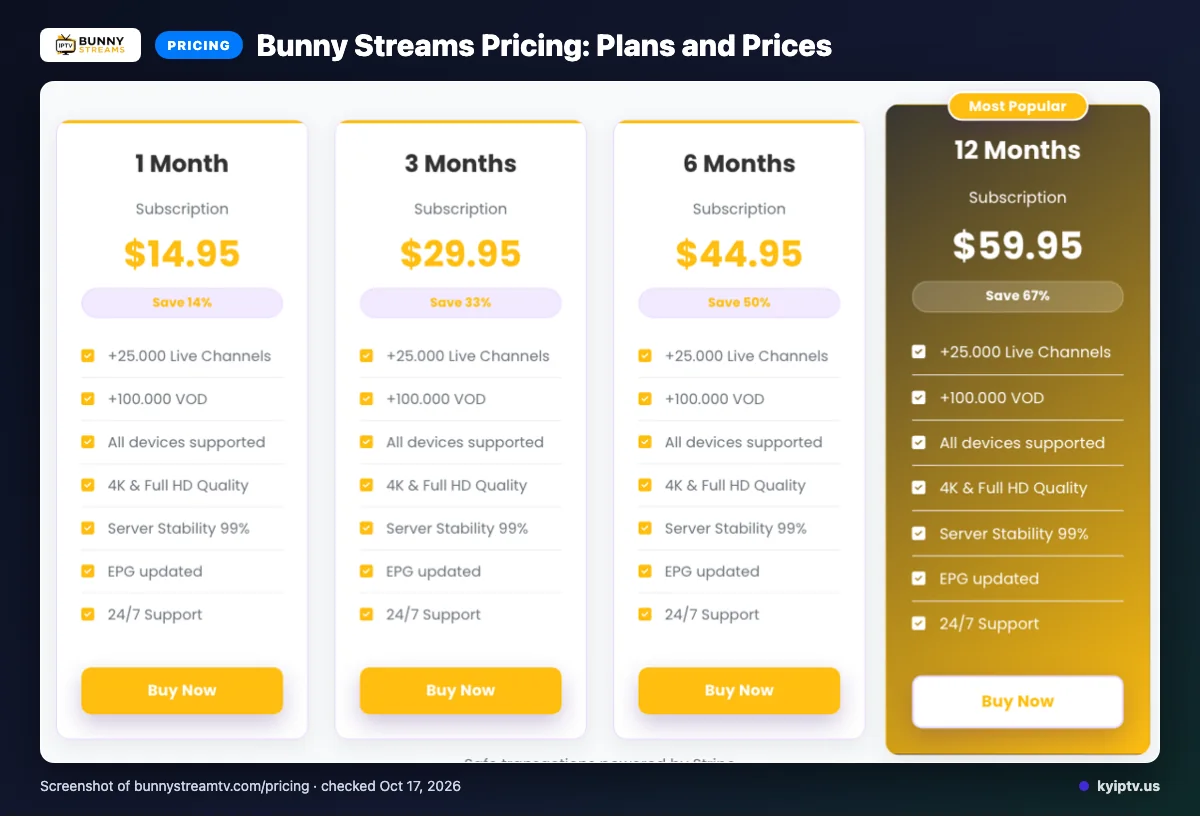
The site lists four subscription options in USD. Each regular subscription includes a single connection; add-on connections can be acquired at checkout or by contacting support.
| Plan | Duration | Price (USD) | Connections |
|---|---|---|---|
| 1 Month Subscription | 1 Month | $14.95 | Single connection |
| 3 Months Subscription | 3 Months | $29.95 | Single connection |
| 6 Months Subscription | 6 Months | $44.95 | Single connection |
| 12 Months Subscription | 12 Months | $59.95 | Single connection |
Prices and plan details were checked on 2026-10-11.
Quick tip: Compare each listed duration and price with how long you intend to subscribe. A longer option may not fit your needs.
Bunny Streams trial, refund policy and payment options
We did not find free-trial information on the pages checked. The site lists Stripe, Visa, MasterCard, American Express, and PayPal as payment methods.
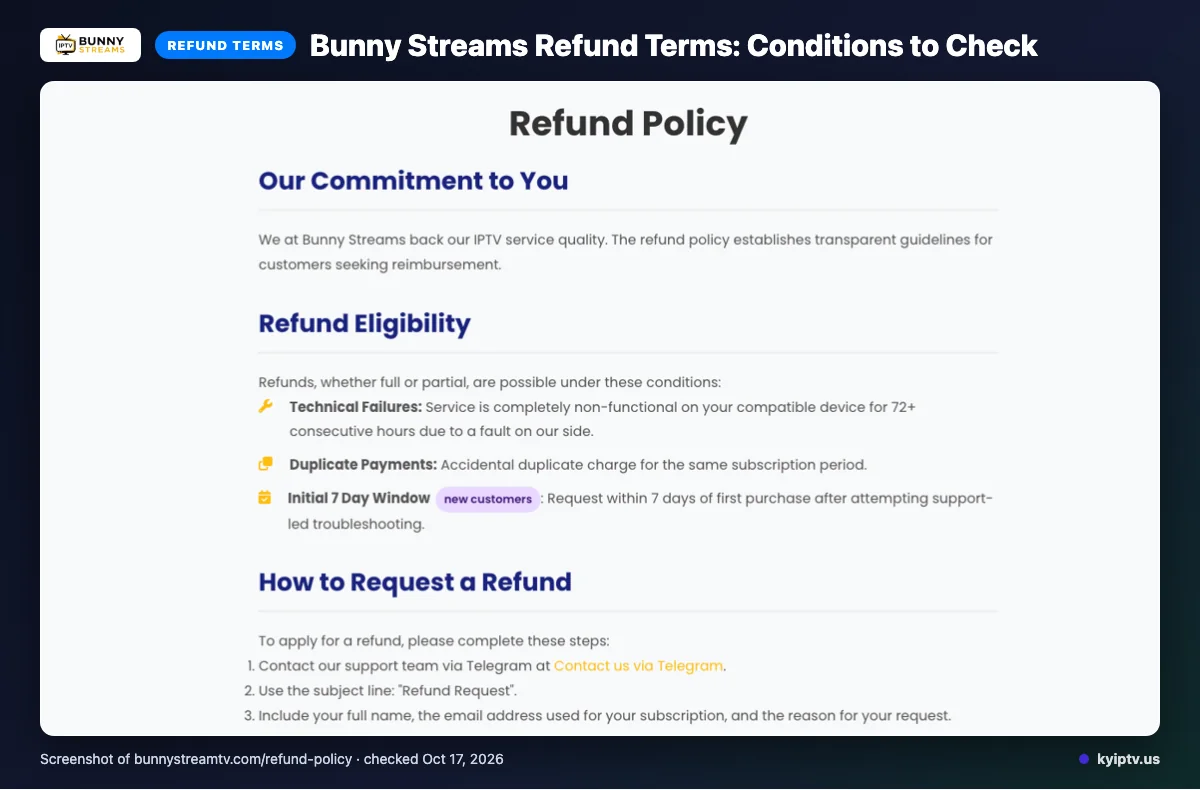
Refunds may be full or partial if the service is completely non-functional on a compatible device for 72+ consecutive hours because of a provider-side fault. The site also lists accidental duplicate payments for the same subscription period and new-customer requests within the initial seven-day window after first purchase, following support-led troubleshooting.
Keep your purchase record and any support correspondence together if you need to request a refund.
The pros and cons of Bunny Streams
Use this section as a shortlist, not a final decision. Compare the listed options with your household’s needs before choosing.
Pros
- Multiple subscription durations, device options, and payment methods give you several ways to compare fit.
- The site’s library claims and TV Guide listing may appeal if you want live and on-demand options.
Cons
- The site does not list catch-up details or specific channel and VOD titles, so you cannot verify those details there.
Quick tip: Use these lists as a shortlist, then check the exact terms and content details that matter to your household.
Is Bunny Streams safe and legal to use?
Its legality depends on content licensing and local law. Claims on a provider’s website alone do not establish whether its content is properly licensed where you live. Independent security-testing details are not listed on its website.
Before subscribing, review applicable local rules and the provider’s terms. Look for clear licensing and privacy information before sharing payment or account details. Check how the terms explain content rights and personal data handling before deciding.
Getting started: how to sign up for Bunny Streams and set it up
Review the listed plans and terms, then choose a subscription and payment option during checkout. The site says activation is instantaneous and access credentials are emailed after checkout.
Before you start: Have your preferred device ready and note the listed device and IPTV Smarters details for setup.
- Open Bunny Streams’ official site and review the subscription options and terms.
- Select your subscription and a payment option shown during checkout.
- After checkout, check your email for access credentials.
- Use the provider’s setup instructions for your device and the listed app details. Do not assume an unlisted device or app is compatible.
Quick tip: Keep your preferred device available before checkout so you can follow the setup instructions once your credentials arrive.
KY IPTV vs Bunny Streams: side by side
KY IPTV lists five one-connection prices; Bunny Streams lists four, with its prices and terms covered above. Match the device row to the screen you plan to use most before weighing plan prices.
| Category | KY IPTV | Bunny Streams |
|---|---|---|
| Plans | 1 month: $14.95; 3 months: $29.95; 6 months: $39.95; 12 months: $59.95; 24 months: $99.95. View plan details. | Four single-connection plans; prices listed above. |
| Trial | 24-hour trial. | We did not find trial information on the pages checked. |
| Refund | Seven-day refund period. | See the refund section above for its conditions. |
| Devices listed | Fire TV, Android TV, Google TV, Samsung and LG Smart TV, Apple TV, iPhone, iPad, Roku, Xbox, PlayStation, Android phones, Windows and Mac. | Smart TVs, Android, iOS, Firestick, Android boxes, MAG devices and PC. |
Is Bunny Streams right for you? Who should pick it and who should look elsewhere
Bunny Streams may suit you if its listed subscription terms, payment methods, and device options fit your setup. If a clearly stated free trial is essential, seek clarification before paying or look elsewhere.
Get details first if you need a specific catch-up feature, channel lineup, or app compatibility answer. Confirm those points directly before choosing.
Quick tip: Write down your must-have device and subscription terms before making a final choice. Use that list to compare options and avoid overlooking a deal-breaker.
If you want another option to compare, we invite you to try KY IPTV’s 24-hour trial. Compare device fit and subscription terms before you pay.
Frequently Asked Questions
Does Bunny Streams renew a subscription automatically?
The site lists auto-renew as a feature, but the pages checked do not explain whether every plan renews automatically or how to turn renewal off. Before paying, review the checkout terms and save your confirmation details so you can verify the billing schedule for your subscription.
Can I use Bunny Streams on more than one connection?
Each regular plan includes a single connection. The site says add-on connections can be acquired at checkout or by contacting support, so compare the available add-on terms with the number of screens you expect to use at once before buying.
What support contact options does Bunny Streams list?
Bunny Streams lists 24/7 support through email, live chat, and Telegram. The pages checked do not provide further details about response times or which contact route handles billing, setup, or account changes. Choose a contact method listed on its site and keep your order information handy.
Does Bunny Streams publish a channel-by-channel lineup?
The pages checked claim 25,000+ live channels and list regions, but a channel-by-channel lineup was not found. Ask about the exact channels you need before subscribing; a large channel count alone does not confirm that a particular station is included.
Are setup instructions available for each listed device?
Setup instructions for each listed device were not found on the pages checked, so confirm the steps for your device before checkout.
What should you check before choosing?
Match the single-connection plan and listed device options to your household setup. Review the checkout terms for auto-renew details and confirm any channel or setup questions before paying.
Want to compare another option? Start the free 24-hour trial with KY IPTV.