
Disclosure: KY IPTV sells its own IPTV service, and KY IPTV and DoxDox IPTV share common ownership. Everything below comes from DoxDox IPTV’s own website, read on October 10, 2026; no streaming tests were run.
This doxdox iptv review finds a service with listed plans, device options, and support contacts, but some published details conflict. Use the plan and setup information on its site as a starting point, then confirm anything important before paying.
DoxDox lists one-connection plans from $14.95 to $59.95. If you want another option, KY IPTV lists plans with no contract and a 24-hour trial.
DoxDox IPTV at a glance
DoxDox IPTV is an internet TV subscription for viewers looking at live television and on-demand programming outside a traditional cable package. Its official site presents the service to viewers in several regions.
The site names the USA, UK, Canada, Europe, Asia, and MENA, and mentions country- and language-based packages. That makes it relevant to cord-cutters comparing options for their location, but you should still check the service details against what you actually want to watch.
This is a website-based overview, not a streaming test. Published claims can help you compare the offer, but they do not show how it will perform on your home internet connection or fit your current setup.
Before you decide, focus on the practical fit:
- Where you plan to watch and whether the service lists packages for your region or language.
- Whether the published subscription terms match your household’s needs.
- Whether the service’s content and setup suit the screens you already use.
Use this review to check those details before you sign up. If you are switching from cable, start with the basics: what you watch, where you watch, and what you want your new TV setup to do.
What’s included with DoxDox IPTV
DoxDox IPTV’s website claims 25,000+ live TV channels and 100,000+ movies and shows. Its channel-page title says 10,000+ channels, while a graphic says 150k+ VOD.
Listed quality includes 4K, HD, Full HD, FHD, and 4K Ultra HD. Named devices include Smart TVs, Android, iOS, Firestick, Android boxes, MAG devices, MAG Box, and PC. The listed app is IPTV Smarters.
The site describes its EPG as user-friendly and updated; catch-up was not listed on the pages checked. Other listed features include anti-freeze technology, load balancing, a global CDN, predictive prefetch, instant channel switching, daily VOD updates, and service that isn’t IP-locked.
Compare the device and app names with your planned hardware before choosing a plan.
How much does DoxDox IPTV cost? Plans and prices
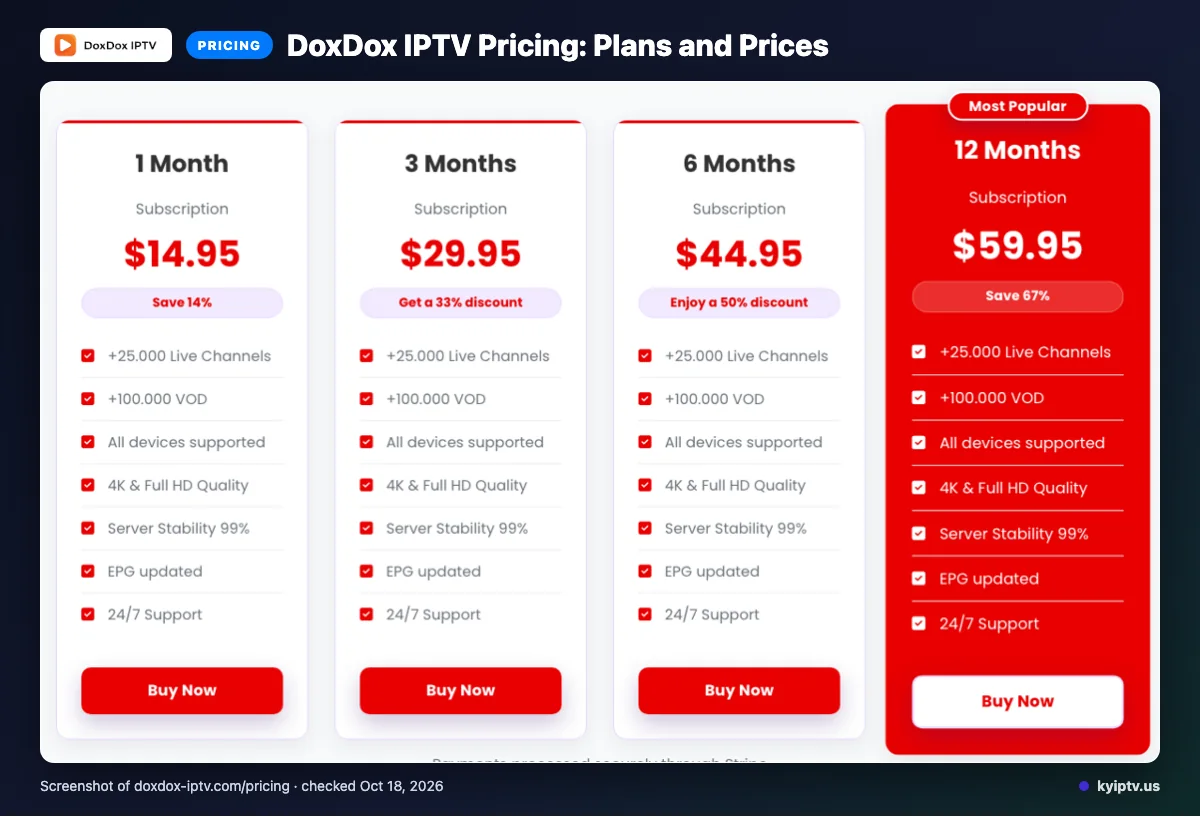
DoxDox IPTV lists plans from one month through twelve months, priced from $14.95 to $59.95. Each standard plan includes one connection.
Prices checked on 2026-10-10:
| Subscription duration | Price | Connections |
|---|---|---|
| 1 Month | $14.95 | One connection |
| 3 Months | $29.95 | One connection |
| 6 Months | $44.95 | One connection |
| 12 Months | $59.95 | One connection |
The site displays prices with a dollar sign but does not identify the currency. Extra connections are available for purchase.
Quick tip: Confirm the checkout currency before paying, since the site does not identify it.
DoxDox IPTV trial, refund policy and payment options
We did not find a free trial listed on the pages checked. The site lists Visa, MasterCard, American Express, PayPal, and Stripe as payment options.
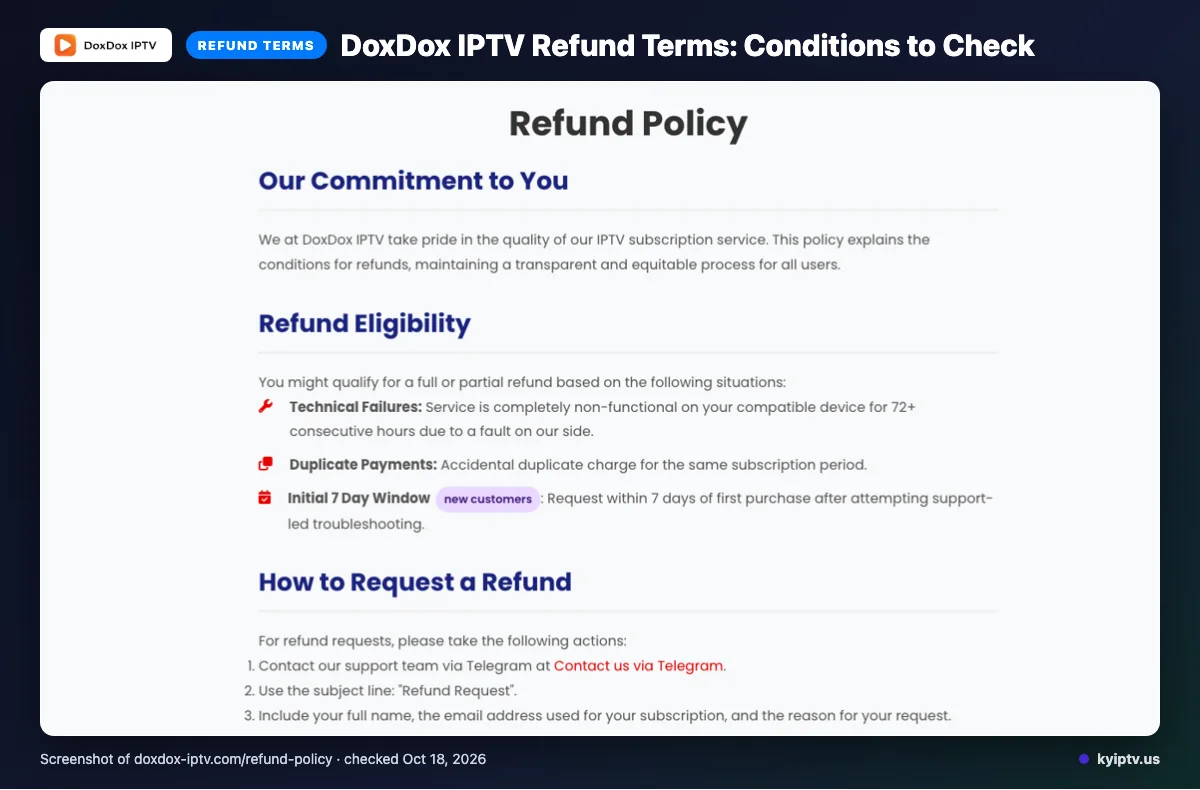
Full or partial refunds may be available for a provider-side failure lasting 72 or more consecutive hours on a compatible device, duplicate payments, or a qualifying new-customer request within seven days of purchase after support-led troubleshooting.
Refunds exclude dissatisfaction with channels or content, internet problems, Terms of Service violations, and geo-blocking outside the provider’s control. Change-of-mind refunds are not usually available after the first week; renewal requests are assessed case by case. Approved refunds are handled within three working days, though funds may take five to ten business days to appear.
Keep your order details and support-led troubleshooting record together if you request a refund.
The pros and cons of DoxDox IPTV
DoxDox lists several device types, an EPG, payment methods, and support channels. Its published information also leaves some details unclear.
Pros
- Named device types include smart TVs, mobile devices, Firestick, Android boxes, MAG devices, and PC.
- The site describes an updated, user-friendly EPG and accepts multiple payment methods.
- Email, live chat, and Telegram support are listed.
Cons
- The channel and VOD totals conflict, as noted above.
- Catch-up viewing is not listed.
Quick tip: Treat feature counts as website claims, not independently verified performance.
Is DoxDox IPTV safe and legal to use?
Whether DoxDox IPTV is legal depends on content licensing and the laws where you live. A website review cannot establish that every stream is authorized or that the service is legal in every location.
This review is based on website information; no stream test was done. The site’s feature and support claims are not proof of content licenses or service security.
Before subscribing, consider local rules and whether the provider has permission to distribute the content you plan to watch. Look for clear licensing information for that content before you pay, including details about the rights or coverage involved.
Getting started: how to sign up for DoxDox IPTV and set it up
Start by reviewing the current plan and setup instructions on DoxDox’s site. Choose from the device and app options it names, and follow its current checkout steps rather than assuming a particular login or installation process.
Before you begin, have these ready:
- A device you plan to use
- The app you plan to use
- Your preferred payment method
- Review the plan, connection count, currency, and payment details on the official site.
- Select a device and app from the options listed there.
- Follow the provider’s current checkout and setup instructions.
- If anything is unclear, contact a listed support channel before completing setup.
Quick tip: Have your device model and chosen app ready when asking support for setup instructions.
KY IPTV vs DoxDox IPTV: side by side
KY IPTV lists plans from one to 24 months, a 24-hour trial, and support for a range of common devices. The earlier sections cover DoxDox IPTV’s published plans and terms; this table points back rather than repeating them.
| What to compare | KY IPTV | DoxDox IPTV |
|---|---|---|
| Plans | 1 month: $14.95; 3 months: $29.95; 6 months: $39.95; 12 months: $59.95; 24 months: $99.95. Each plan is for one connection. | See the plans and prices section above. |
| Trial | 24-hour trial. | See the trial and refund section above. |
| Refund | 7-day refund policy. | See the trial and refund section above. |
| Devices | Fire TV, Android and Google TV, Samsung and LG TVs, Apple devices, Roku, Xbox, PlayStation, Windows, and Mac. | See the listed devices in the DoxDox IPTV section above. |
Compare the plan length and connection count with your household’s needs before paying. For setup on the devices you already own, we invite you to try KY IPTV with its 24-hour trial.
Is DoxDox IPTV right for you? Who should pick it and who should look elsewhere
DoxDox may suit you if your device, region, and package needs match the details on its site. Look elsewhere if you need verified catalog totals, a clearly stated currency, or a confirmed catch-up feature.
Quick tip: Make your choice only after checking the details that matter most to your household, including what you watch and how you plan to use the service.
If you want to compare another option, we invite you to try KY IPTV’s 24-hour trial before choosing a plan.
Frequently Asked Questions
Does DoxDox IPTV work with a VPN?
DoxDox’s website does not state whether VPN use is supported. It says the service is not IP-locked, but that does not confirm VPN compatibility or explain how VPN connections behave. Ask DoxDox support before subscribing if you plan to use a VPN, and mention your device and location.
Can you cancel a DoxDox IPTV subscription before it renews?
The pages checked do not explain how to cancel a subscription or whether plans renew automatically. DoxDox says renewal refunds are handled case by case, but that does not establish a cancellation process. Contact its listed support channels before your plan renews and ask for the steps and any deadline.
Can you use DoxDox IPTV while traveling?
DoxDox lists service regions including the USA, UK, Canada, Europe, Asia, and MENA, and says its service is not IP-locked. The site does not explain access rules for travel or guarantee availability in every location. Check with support about your destination before relying on the service away from home.
Does DoxDox IPTV provide setup instructions by email?
DoxDox lists email support, but the pages checked do not say whether setup instructions are sent by email. Its site names IPTV Smarters and several device types, without detailing an email setup process. Contact support and ask for instructions for your specific device before you begin installation.
Can you change your DoxDox IPTV package after subscribing?
The pages checked do not explain whether you can change packages after subscribing or how to make a change. DoxDox lists plans lasting from one to twelve months, each with one connection. Ask its email, live chat, or Telegram support about package changes before purchasing if your needs may shift.
What should you check before subscribing?
Confirm the current price, connection limit, device setup, and refund terms directly with DoxDox. Its published channel and VOD totals differ across pages, so verify the package details that matter to you before paying.
For another option, start the free 24-hour trial with KY IPTV.