
Disclosure: KY IPTV sells its own IPTV service, and KY IPTV and Eves TV share common ownership. Everything below comes from Eves TV’s own website, read on October 10, 2026; no streaming tests were run.
This eves tv review finds Eves TV may fit your household if its published device and content lists meet your needs. Its Monthly price is listed, but the standard-plan connection count is not.
Compare those details with your cable bill and setup needs before switching. KY IPTV also lists plans for viewers moving live TV to devices they already own.
Eves TV at a glance
Eves TV is the service reviewed here. Its website presents it for viewers seeking live TV and on-demand titles.
The listed regions are the UK, USA, Canada, and Europe. You can read the provider’s description on the official Eves TV website.
Quick tip: Compare those regions with the places where you need to watch, especially if you plan to view from more than one location. The regional list is a useful first fit check, but it does not show how the service will perform at your address.
What’s included with Eves TV
Eves TV lists 50,000+ live TV channels and 150,000+ movies and series. Its published quality options include 4K Ultra HD and Full HD, but that does not mean every title is available in either format.
Listed devices include Smart TV, Firestick, Fire TV, Android, Android TV, iPhone, Apple TV, PC, Mac, and Windows. The listed apps are TiviMate and IPTV Smarters Pro; the website does not detail every device-and-app combination.
The service claims 7-day Catch-Up TV, with rewind up to 7 days on thousands of channels. Check the device and app combination you plan to use before choosing a subscription.
How much does Eves TV cost? Plans and prices
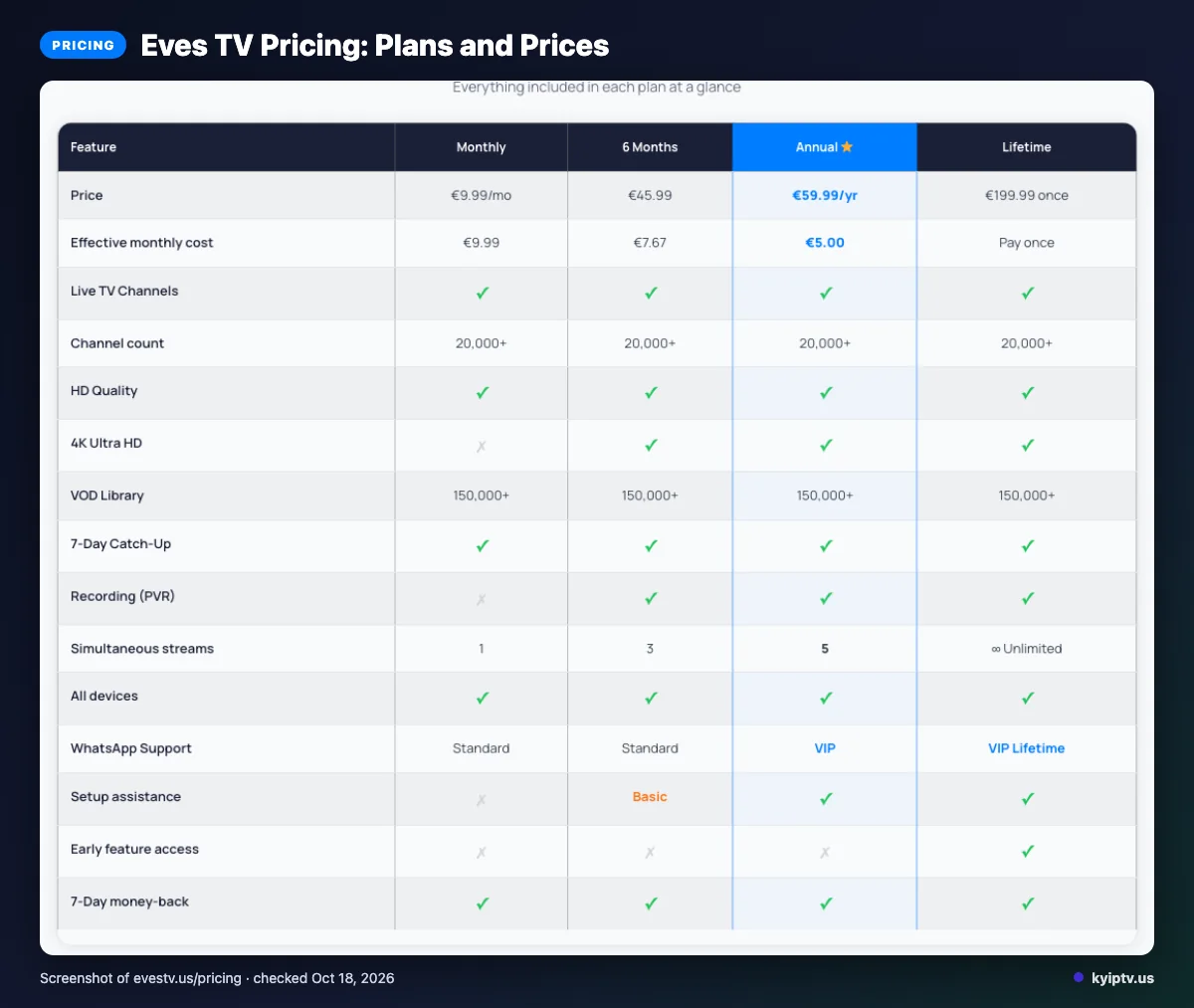
The listed Monthly plan costs € 9 .99 per month. Its standard-plan connection count is not listed on the website.
| Plan | Duration | Listed price | Connections |
|---|---|---|---|
| Monthly | Monthly | € 9 .99/mo | Not listed on the website |
Checked: 2026-10-10. The Family Plan section says “All plans billed annually,” which conflicts with the Monthly plan’s displayed monthly price.
Quick tip: Treat the displayed monthly price and annual-billing wording as separate details to clarify before paying.
Eves TV trial, refund policy and payment options
Eves TV offers: “Try the service free; get instant trial access with no credit card and no upfront payment, then subscribe after you’re satisfied.” Its website does not list the trial duration.
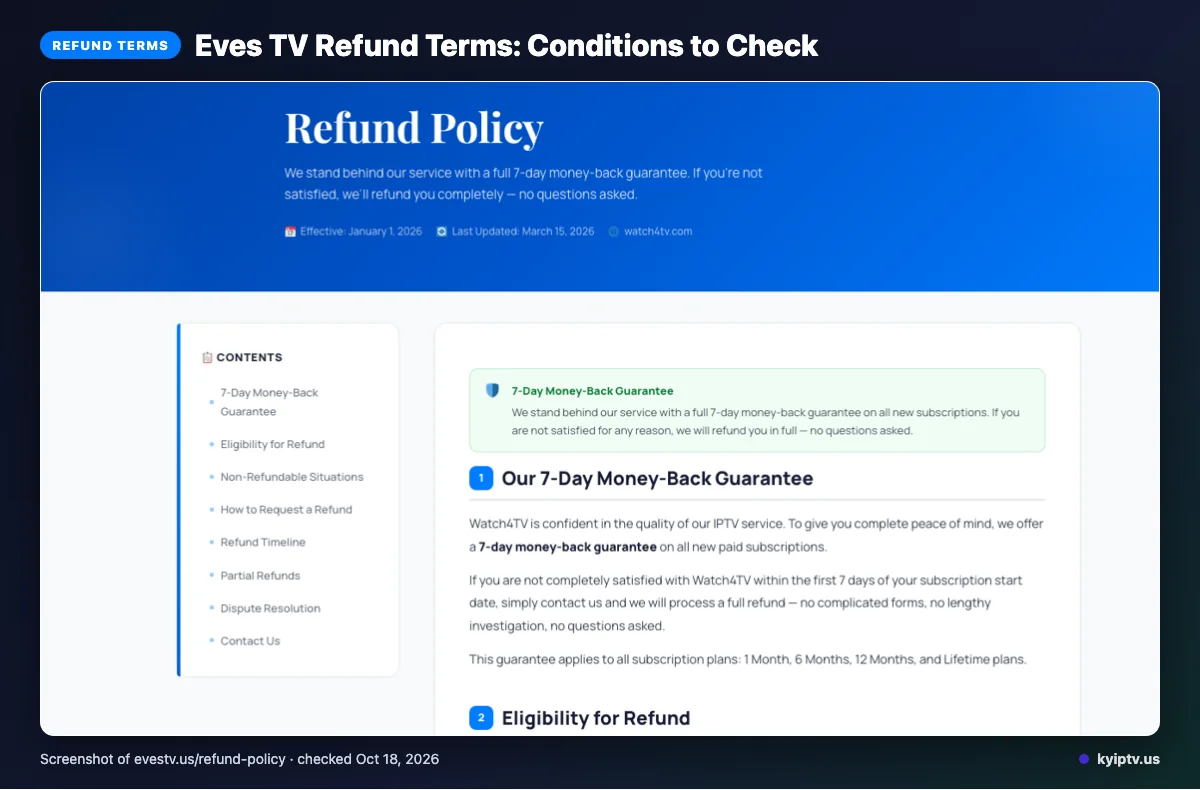
The refund wording is: “Full refund within 7 days — no questions asked.” Listed payment options are Card, PayPal, Crypto, and Bank Transfer.
Save the checkout and refund terms shown when you subscribe, so you have the exact wording for your records.
The pros and cons of Eves TV
The published details offer useful breadth, but leave some planning questions open. Here are the main trade-offs to weigh before switching from cable.
Pros
- The published content claims cover a broad range of live TV and on-demand titles.
- Its listed viewing devices span several device types, while the trial and refund terms give you ways to evaluate the offer.
Cons
- The trial duration and standard-plan connection count are not listed, making it harder to plan a household setup.
- The available plan details leave household cost comparisons less clear, especially if several people will watch at once.
Is Eves TV safe and legal to use?
You can’t determine legality or safety from a feature list alone. Legality depends on content licensing and the laws where you watch.
Before subscribing, look for clear information about who licenses the content and whether those rights cover your location. Check that information before sharing payment details.
Use a unique password, avoid sending account or payment details through chat, and choose a payment method with protections you understand. A technical feature or refund offer does not prove that content is licensed or that an account is safe. If licensing information is unclear, pause before paying.
Getting started: how to sign up for Eves TV and set it up
Start on Eves TV’s official site and follow the instructions shown there. Review the displayed plan and terms before choosing an access option.
Before you begin: Have your chosen viewing device ready so you can follow the setup instructions on it.
- Your chosen viewing device
- Review the plan and terms displayed on the official site.
- Choose an access option presented there, then follow its on-screen instructions.
- Prepare to watch using a compatible device and app listed in the overview.
- If you need help with Eves TV’s setup instructions, contact its listed WhatsApp support.
Before contacting support, keep the instructions you are following open on your device so you can describe where you need help.
KY IPTV vs Eves TV: side by side
Compare plan duration and device fit first, then weigh each service’s trial and refund terms. The table keeps Eves TV’s previously listed details brief.
| Point | Eves TV | KY IPTV |
|---|---|---|
| Plans | Monthly plan and price listed above. | One-connection plans: $14.95 for one month, $29.95 for three, $39.95 for six, $59.95 for twelve, or $99.95 for twenty-four. |
| Trial | See the trial terms above. | 24-hour trial. |
| Refund | See the refund terms above. | Seven-day refund. |
| Devices | See the device list above. | Fire TV, smart TVs, Apple devices, Roku, gaming consoles, phones, and computers. |
Is Eves TV right for you? Who should pick it and who should look elsewhere
Eves TV may suit you if its published device and content lists match what your household needs. If you need the trial length or connection allowance clearly stated before committing, compare another option first.
Before leaving cable, weigh the full plan terms against how many people watch, which devices they use, and what your household expects to spend. Confirm the details that affect your setup and budget before you switch.
If you want another option to compare, we invite you to try KY IPTV’s 24-hour trial before choosing a cable replacement.
New to KY IPTV? See the setup guide, compare plans and prices, or check the channel list.
Frequently Asked Questions
Does Eves TV work on more than one device at a time?
The website does not list a standard-plan connection count, so the Monthly plan’s simultaneous-device allowance is unclear. Eves TV names several device types, including Smart TV, Firestick, Android, iPhone, Apple TV, PC, Mac, Fire TV, and Android TV. Those options do not establish how many screens can stream at once.
Does Eves TV’s 4K claim apply to every channel?
Eves TV lists 4K Ultra HD and Full HD as quality options, but its published details do not say every channel carries 4K. Treat those formats as service-level claims, not a promise about each channel or title. The website does not specify availability title by title.
Can you record with Eves TV’s Monthly plan?
Eves TV lists recording for its 6 Months, Annual, and 2 Year plans. The details we checked do not state whether recording is included with the Monthly plan, so confirm that point before choosing it.
Can you use Eves TV while traveling outside its listed regions?
Eves TV lists the UK, USA, Canada, and Europe as regions, but its published details do not explain whether access continues when you travel elsewhere. Ask the provider about access in your destination before paying. The region list alone does not establish travel access.
Where can you find Eves TV’s licensing information?
The details reviewed here do not identify content licensors or spell out licensing coverage by location. Ask Eves TV directly before subscribing, and compare its answer with the laws where you watch. A channel count or quality list cannot establish that content rights cover your location.
What should you check before switching?
Before leaving cable, confirm how many connections the Monthly plan allows and whether its lineup fits your household. Eves TV advertises a free trial and a 7-day refund, but does not state the trial duration.
If you want to compare another option, start the free 24-hour trial from KY IPTV.