
Disclosure: KY IPTV sells its own IPTV service, and KY IPTV and HuluxTV share common ownership. Everything below comes from HuluxTV’s own website, read on October 12, 2026; no streaming tests were run.
This huluxtv review finds four one-device plans and a broad published device list, but conflicting content totals need a closer look. Check the device and plan details before you switch.
If you are comparing KY IPTV too, weigh device fit and plan terms before leaving cable.
HuluxTV at a glance
HuluxTV describes itself as an IPTV service offering live TV and on-demand movies and shows. Its official site names the USA, UK, Canada, Europe, Asia, MENA, France, Turkey, Greece, Belgium, the Netherlands, Arabic, Latin America, India, and Germany.
That list suggests the regions and audiences HuluxTV targets. Quick tip: treat those names as the site’s stated focus, not proof that every stream is available in each location.
What’s included with HuluxTV
The channel and VOD totals conflict, as noted above. The site lists 4K, HD, Full HD, FHD, and 4K Ultra HD, but does not list quality by individual channel.
Listed device categories include Smart TVs, Android, iOS, Firestick, Android boxes, MAG devices, MAG Box, and PC. IPTV Smarters is the listed app; the site does not name specific models.
The site says its EPG is updated, but catch-up is not listed. It also claims anti-freeze technology, Global CDN, Predictive Content Prefetch, “Server Stability 99%,” and that the service is not IP-locked. These are site claims, not streaming test results.
Before signing up, compare the device model and app instructions shown during signup with the equipment you plan to use.
How much does HuluxTV cost? Plans and prices
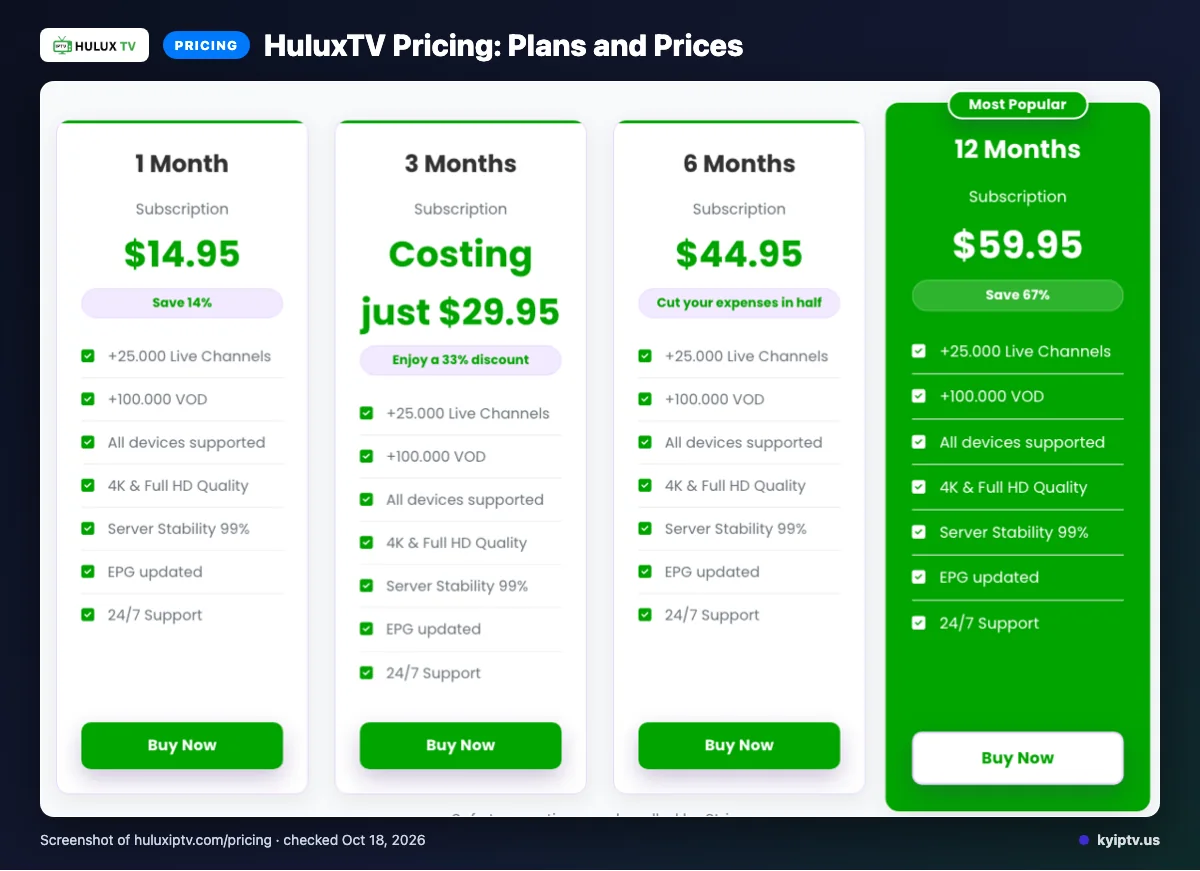
HuluxTV lists four subscription plans, each allowing one device. The prices are in USD, and the pages were checked on 2026-10-12.
| Plan duration | Price | Device allowance |
|---|---|---|
| 1 Month | $14.95 | 1 device |
| 3 Months | $29.95 | 1 device |
| 6 Months | $44.95 | 1 device |
| 12 Months | $59.95 | 1 device |
Quick tip: Compare the full plan price with how long you are willing to commit. Choose by the total you are comfortable paying for that period, rather than assuming a monthly equivalent or discount.
HuluxTV trial, refund policy and payment options
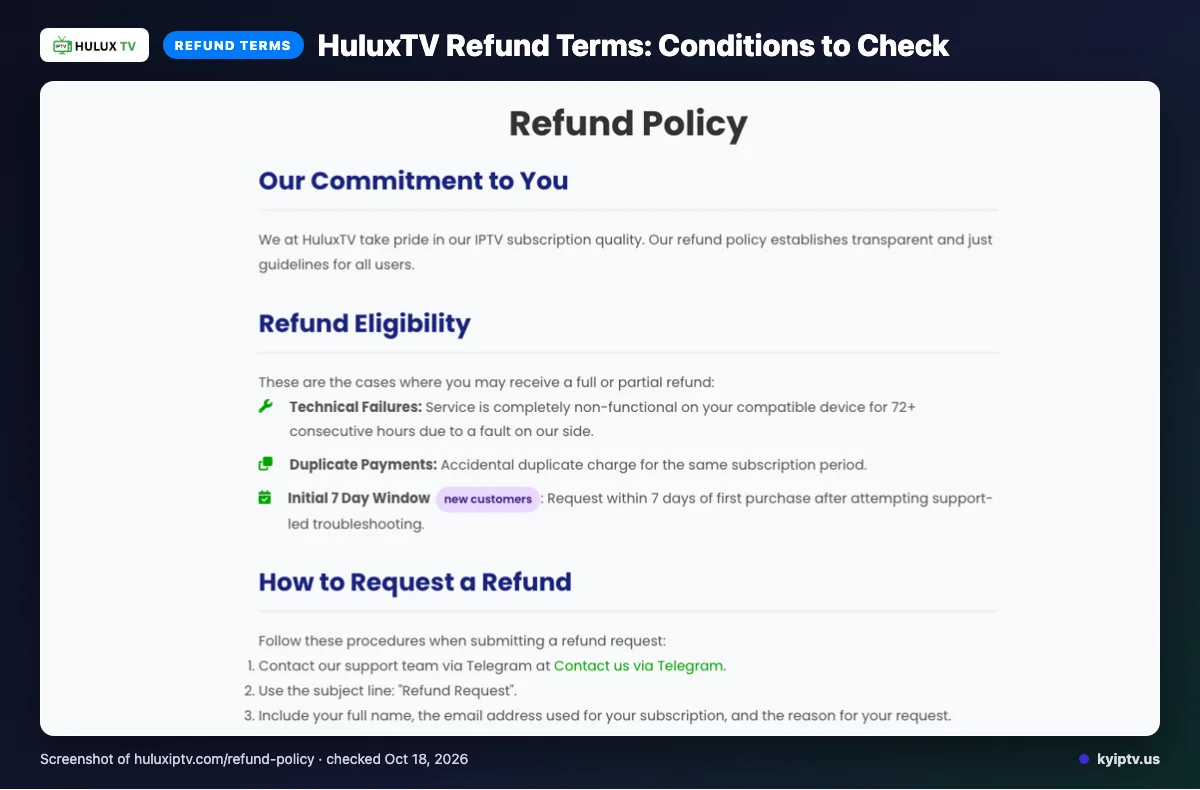
We did not find a free trial on the pages checked. Subscriptions renew automatically at the end of each billing period.
A full or partial refund may be available if service is completely non-functional on a compatible device for 72 or more consecutive hours because of a HuluxTV-side fault, for duplicate payments, or for a request within 7 days of first purchase after support-led troubleshooting. Refunds exclude dissatisfaction with channels or content, slow or unstable internet, Terms of Service violations, and geo-blocking beyond HuluxTV’s control. Change-of-mind refunds are generally unavailable after the initial 7 days; renewal refunds are evaluated case by case.
Listed payment options are Visa, MasterCard, American Express, PayPal, and Stripe. Read the renewal and refund terms before completing checkout.
The pros and cons of HuluxTV
The reviewed pages list useful device and payment options, but leave some details unclear. Treat the lists below as website information, not evidence of streaming performance.
Pros
- Listed device categories include smart TVs, phones and tablets, streaming sticks, boxes, and PCs.
- The site describes an updated electronic program guide for browsing channels.
- You can choose from several listed payment methods, including cards, PayPal, and Stripe.
Cons
- The content-count mismatch noted earlier leaves the published totals unclear.
- Catch-up viewing is not stated on the pages reviewed.
Quick tip: Before paying, ask HuluxTV to clarify the content totals, catch-up availability, and trial options. These gaps are questions to resolve, not proof of service performance.
Is HuluxTV safe and legal to use?
IPTV is not automatically legal or illegal; content rights and local law matter. We did not find enough licensing detail in the pages checked to verify HuluxTV’s rights for your location.
A website’s service claims do not, by themselves, prove that the content is authorized. We also cannot verify security or privacy practices from the available information, so review the terms before paying.
Before you subscribe, check these points:
- Look for clear information about the company operating the service and how to contact it.
- Ask how it obtains distribution rights for content available where you live.
- Read the privacy policy and terms for data handling, account rules, and cancellation steps.
- Use a payment method with transaction records, and avoid sharing passwords or verification codes.
Install viewing software only from a source you trust. Avoid unexpected download links, and do not give an app access to information it does not need.
If the provider cannot answer questions about licensing or account security clearly, pause before subscribing. For legal advice about your situation, consult a qualified professional in your area.
Getting started: how to sign up for HuluxTV and set it up
Start by confirming your device fits the service details listed above and that you have a reliable internet connection. Complete signup, then use the account and setup instructions provided after purchase.
What do you need before you start?
- The device you plan to watch on
- A reliable internet connection
- Access to the email address used during signup
How do you set it up?
- Review the device information above before choosing where you will watch.
- Complete signup and enter your contact details carefully.
- Keep the confirmation email. Use the login and connection details supplied in the setup instructions.
- Install the app specified in those instructions from your device’s app store.
- Open the app, enter your supplied details, and save the connection settings if prompted.
- Open the program guide and select something to check that the setup is working.
What should you check if playback does not start?
Confirm the device is online, recheck each login field, and close and reopen the app. If the problem continues, try restarting the device and following the service’s setup instructions again.
Before you call support, note the device you are using, the exact error message, and which setup step failed.
KY IPTV vs HuluxTV: side by side
Compare the plan terms and device lists before switching. The HuluxTV details below point back to the earlier sections to avoid repeating them.
| What to compare | KY IPTV | HuluxTV |
|---|---|---|
| Plans | 1 month: $14.95; 3 months: $29.95; 6 months: $39.95; 12 months: $59.95; 24 months: $99.95. One connection per plan. | See the plan table above for listed durations and prices. |
| Trial | 24-hour trial. | See the trial section above. |
| Refund | 7-day refund period. | See the refund terms above. |
| Devices | Fire TV, Android and Google TV, Samsung and LG TVs, Apple devices, Roku, Xbox, PlayStation, Windows, and Mac. | See the device list above. |
For your household, start with the devices you already own and how many connections you need. Then compare the full plan cost and trial terms before paying.
Is HuluxTV right for you? Who should pick it and who should look elsewhere
Verdict: HuluxTV may suit you if its published device and connection details match your household. The website can help you screen for fit, but it cannot tell you how well service will perform in your home.
Who should pick HuluxTV?
Consider it if your intended device fits the compatibility information above and the terms already summarized work for you. Before switching, confirm that your specific device model and home setup are covered, and decide whether you are comfortable with the service details provided. This is a more practical choice when you can accept some uncertainty and are ready to review the terms before paying.
Who should look elsewhere?
Look elsewhere if you need confirmed compatibility for a specific model and cannot get a clear answer. Pause before switching if you need firm assurance about service performance at your address or details the site does not clearly settle. Keep cable or satellite in place until you have answers that meet your needs.
Quick tip: Write down your must-haves before you cancel, including the devices you plan to use and the viewing arrangements your household needs. Compare those requirements with the information already covered above, then ask HuluxTV about anything that remains unclear.
If you want another option to compare, we invite you to try KY IPTV with a 24-hour trial before choosing a longer plan.
New to KY IPTV? See the setup guide, compare plans and prices, or check the channel list.
Frequently Asked Questions
Check the Details Before You Switch
Confirm your device appears in HuluxTV’s published list and compare the one-device plan prices. Its site gives conflicting channel and on-demand totals, so treat those figures cautiously.
For a practical comparison, check the service terms and setup details before choosing.
We invite you to start the free 24-hour trial with KY IPTV.