
Disclosure: KY IPTV sells its own IPTV service, and KY IPTV and IPTV Schedule share common ownership. Everything below comes from IPTV Schedule’s own website, read on October 12, 2026; no streaming tests were run.
This iptv schedule review finds published device options and plans starting at $14.95, but it is not a playback test. Use the listed terms to judge whether the service fits your setup.
Check your device, connection limit, renewal terms, and refund rules before switching from cable. The review also compares IPTV Schedule with KY IPTV.
IPTV Schedule at a glance
IPTV Schedule presents regional bundles for viewers in the USA, Canada, Europe, and MENA. Its website says the content includes programming from the USA, UK, Canada, Europe, and Asia.
This is a website-based review of its published information, not a playback test. The regional offers appear aimed at viewers who want content tied to these markets.
Quick tip: Before subscribing, open the official site and confirm you are viewing the IPTV Schedule service described here.
What’s included with IPTV Schedule
The channel and VOD figures, including the site’s conflicting counts, are covered above. Its quality labels are website claims, not proof that every title streams at those resolutions.
The site lists Smart TVs, Android boxes, Firestick, MAG devices, iOS, PC, and Android. It names IPTV Smarters. Specific device models and further app details are not listed on its website.
For setup planning, these are broad device categories, not model-by-model instructions. Match the named app and device category to the screen you plan to use.
The site describes an updated, simple-to-use Electronic Program Guide (EPG). Catch-up is not listed on its website, so do not assume you can replay missed programs.
How much does IPTV Schedule cost? Plans and prices
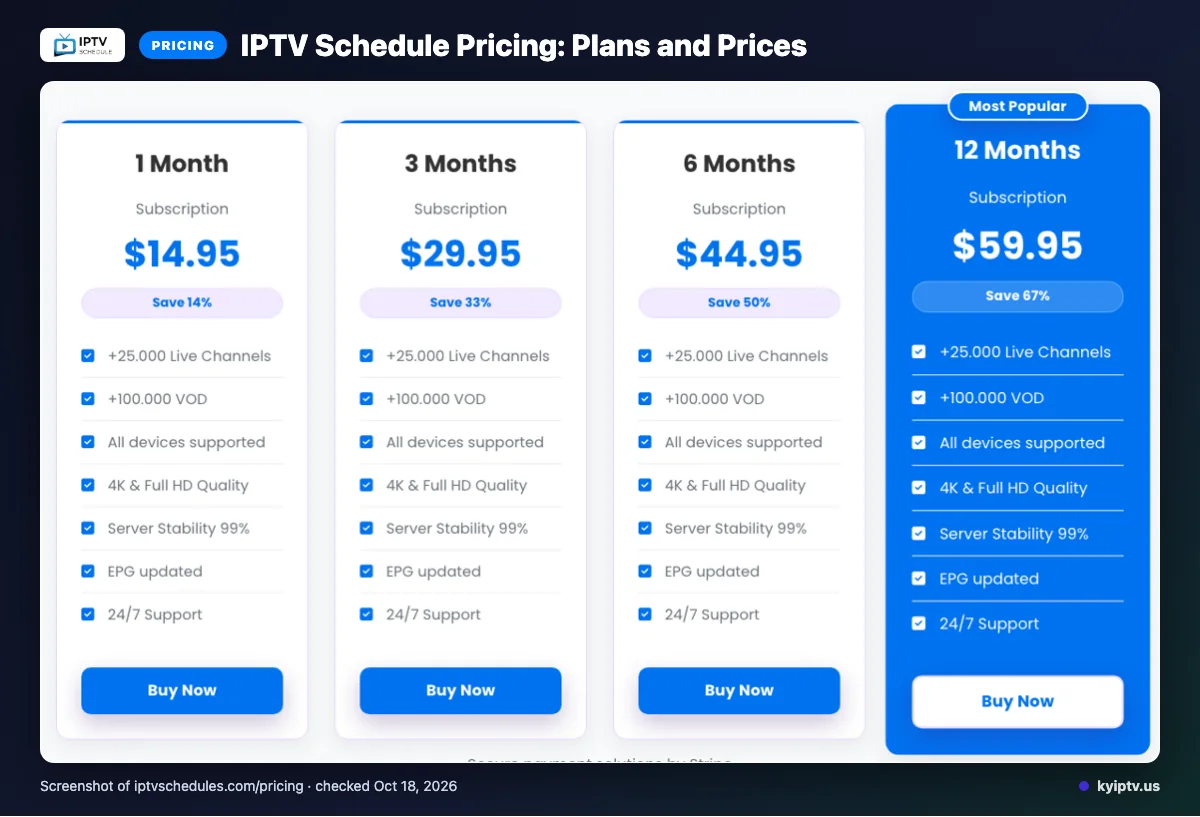
IPTV Schedule lists four USD plans, each allowing one connection at a time. We checked the website on 2026-10-12.
| Plan | Duration | Price | Connection term |
|---|---|---|---|
| 1 Month Subscription | 1 Month | $14.95 | One connection at a time |
| 3 Months Subscription | 3 Months | $29.95 | One connection at a time |
| 6 Months Subscription | 6 Months | $44.95 | One connection at a time |
| 12 Months Subscription | 12 Months | $59.95 | One connection at a time |
Add-on connection pricing is not listed on its website.
Quick tip: Compare each plan term with how long you expect to use the service before choosing.
IPTV Schedule trial, refund policy and payment options
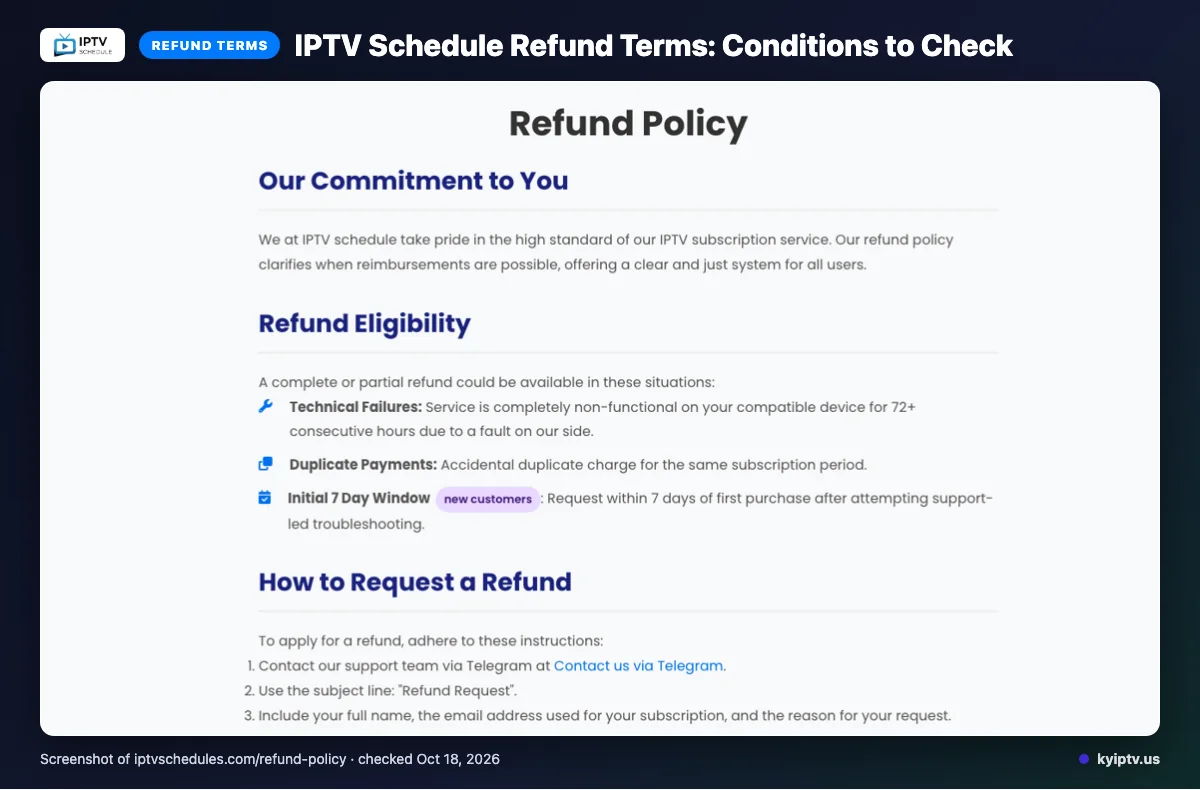
We did not find a free trial on the pages we checked. The stated refund terms allow complete or partial refunds for service that is completely non-functional on a compatible device for 72 or more consecutive hours due to a fault on the service’s side, or for accidental duplicate charges.
New customers can request a refund within 7 days of their first purchase after trying support-led troubleshooting. Refunds exclude dissatisfaction with content, slow or unstable internet, Terms of Service violations, and geo-blocking beyond the service’s control. Renewal requests are reviewed case by case.
Listed payment methods are Visa, MasterCard, American Express, and PayPal. Keep your purchase details available if you need to discuss a refund with support.
The pros and cons of IPTV Schedule
IPTV Schedule’s listed account controls and streaming features may suit you if you want a managed subscription. The main trade-off is that website descriptions do not confirm how those features perform on your connection.
Pros
- You can adjust or stop automatic renewal through the account panel, which gives you control over future billing.
- The site describes load balancing, adaptive routing, a global CDN, and content prefetching as tools to reduce lag.
- Support is listed through email, live chat, and Telegram, giving you several ways to ask for help.
Cons
- Automatic renewal is the default, so remember to change it in the account panel if you do not want another billing period.
- Performance claims are website descriptions, not playback results confirmed in this review. Your internet connection and home network still affect streaming.
- The feature descriptions do not tell you how consistently each tool works during everyday viewing.
Quick tip: Before switching, decide whether account-managed renewal and the listed support options fit how you handle subscriptions. If smooth playback is your priority, judge the service on your own network rather than relying on feature claims.
Is IPTV Schedule safe and legal to use?
IPTV Schedule’s legal status and account-security practices cannot be confirmed from the website information available for this review. Do not assume the service is authorized or unsafe without checking the details that matter to you.
IPTV is a delivery method, not proof that a provider has permission to distribute its content. The information reviewed does not establish IPTV Schedule’s content-licensing arrangements, so you cannot use it alone to confirm whether viewing is authorized where you live.
How can you check whether an IPTV service is legal?
Look for clear information about who distributes the content and what rights apply in your location. Laws differ, so seek local legal guidance if the provider’s authorization is unclear.
Also review the service’s terms and privacy information before sharing account details. The website details available here do not give enough information to assess how account data is protected or handled.
How can you reduce safety risks?
Use a cautious setup and avoid sharing credentials beyond the household members who need access. For any player app, use an official app store where possible, check the developer name, and review requested permissions before installing.
- Read the service terms and privacy information before signing up.
- Use a unique password and keep account details private.
- Avoid installation files from unfamiliar websites or messages.
These steps can reduce avoidable account and device risks, but they do not verify a provider’s licensing or guarantee security. If the service cannot answer questions about content rights or data handling clearly, pause before subscribing.
Getting started: how to sign up for IPTV Schedule and set it up
Start by checking your device and internet connection, then follow the sign-up and setup instructions shown by IPTV Schedule. Set it up on one screen first so you can confirm the basics before moving from cable or satellite.
Before you start: Have your device, a stable internet connection, and access to your email ready.
-
Choose a subscription through IPTV Schedule’s website. Review the terms before completing checkout, and keep your confirmation for reference.
-
Check the setup instructions for your device. Use the app or connection method specified there; do not assume an app works just because it is available on your device.
-
Install the required app from your device’s official app store when instructed.
-
Enter the connection details provided during sign-up, following the service’s instructions. Check each field carefully, since a mistyped detail can prevent a connection.
-
Open the guide and try a few programs. Confirm that playback starts and that the guide matches what you expect before relying on the setup.
Keep your account confirmation and setup details somewhere private. If you change devices later, follow the service’s instructions again rather than copying settings blindly.
Before you call support: Restart the app and device, check your internet connection, and re-enter the connection details. If the problem remains, contact the support channel listed by the service and describe the device and error you see.
KY IPTV vs IPTV Schedule: side by side
Both services list plans for different subscription terms, but their device lists differ. Compare the terms already covered above, then check which devices you want to use.
| What to compare | KY IPTV | IPTV Schedule |
|---|---|---|
| Plans | One, three, six, twelve, or twenty-four months; one-time payment per plan. | Four subscription terms; see the plan details above. |
| Trial | 24-hour trial. | See the trial details above. |
| Refund | 7-day refund period. | See the refund terms above. |
| Devices | Fire TV, Android and Google TV, Samsung and LG TVs, Apple devices, Roku, Xbox, PlayStation, Windows, and Mac. | Listed categories include Smart TVs, Android boxes, Firestick, MAG devices, iOS, PC, and Android. |
For a cable switch, match the device row against the screens you already own. KY IPTV lists a wider range of device types, including Roku, game consoles, and computers; IPTV Schedule names MAG devices.
KY IPTV’s plans use one-time payments and have no contracts or activation fees. See the KY IPTV plan prices before choosing a term. IPTV Schedule plan and renewal details are covered above.
If you want to try KY IPTV on your own devices before choosing a plan, we invite you to use the 24-hour trial.
Is IPTV Schedule right for you? Who should pick it and who should look elsewhere
IPTV Schedule may suit you if its published device information and subscription terms match how you watch. Look elsewhere if you need a feature, device detail, or billing arrangement the site does not clearly cover.
Pick it if you have checked the setup details for your own device and are comfortable choosing from the terms already covered in this review. It may also fit if you are ready to manage the service using the information the provider publishes.
Look elsewhere if you need certainty about a specific device model, app, or feature before paying. A broad device category may not answer every setup question, so get clarity on anything essential to your household first.
For a cable switch, think through who will watch, what equipment they will use, and which terms matter most to you. If the available details leave a key question unanswered, compare other services before committing. Do not assume a feature or setup method is included unless the provider describes it.
Bottom line: choose IPTV Schedule only if its stated terms and setup information fit your needs. If they do not, keep looking for an option that better matches your devices and viewing habits.
Want to compare setup on your own equipment before choosing? We invite you to try KY IPTV’s 24-hour trial.
New to KY IPTV? See the setup guide, compare plans and prices, or check the channel list.
Frequently Asked Questions
What to check before you switch
Confirm the device you plan to use and review IPTV Schedule’s one-connection limit, renewal settings, and refund terms. Its website claims describe the service, but they do not confirm performance on your internet connection.
Set it up on one screen first, then decide whether its terms work for your household.
Start the free 24-hour trial from KY IPTV to compare it on the devices you already own.