
Disclosure: KY IPTV sells its own IPTV service, and KY IPTV and IPTV UK share common ownership. Everything below comes from IPTV UK’s own website, read on October 10, 2026; no streaming tests were run.
This iptv uk review finds published plan options and a broad device list, but its channel, VOD, and picture-quality figures are website claims. Check your device, connection count, refund terms, and payment method before replacing cable.
KY IPTV is another option to compare if you want a 24-hour trial before choosing a plan.
IPTV UK at a glance
IPTV UK presents itself as a live-TV service with films and series, for viewers seeking UK, US, or worldwide channel coverage. Its official website lists the United States, Canada, mainland Europe, the Middle East, and Asia Pacific.
That regional reach may interest you if your household watches programming from more than one market. For a cable or satellite switch, use the listed regions as a starting point, then focus on where your regular viewing comes from. A broad regional description alone does not tell you whether the service fits your particular viewing habits.
Quick tip: Compare the stated regions with the programming you actually want before choosing a plan.
What’s included with IPTV UK
IPTV UK’s website claims 21,000+ live channels and 120,000+ films and series. It lists 4K, Full HD, and HD picture formats.
Named devices include Amazon Firestick, Fire TV, Android-based TVs, phones, tablets, iPhone, iPad, Mac, Samsung, LG, and Sony Smart TVs, plus Google Chromecast. App names are not listed on its website.
The integrated EPG provides schedules, upcoming shows, and catch-up information. The site also lists pay-per-view, live sport, and weekly content additions.
Before signing up, compare your intended device with the named device list.
How much does IPTV UK cost? Plans and prices
IPTV UK lists eight plans, priced from £9.99 to £74.99 in GBP. Prices vary by duration and listed connection count.
| Plan | Duration | Connections | Price |
|---|---|---|---|
| 1 MONTH | 1 month | 1 connection | £9.99 |
| 1 MONTH | 1 month | 2 connections | £14.99 |
| 3 MONTHS | 3 months | 1 connection | £19.99 |
| 3 MONTHS | 3 months | 2 connections | £29.99 |
| 6 MONTHS | 6 months | 1 connection | £29.99 |
| 6 MONTHS | 6 months | 2 connections | £49.99 |
| 12 MONTHS | 12 months | 1 connection | £49.99 |
| 12 MONTHS | 12 months | 2 connections | £74.99 |
Site checked October 10, 2026.
Quick tip: Choose a connection count that fits your intended setup; do not assume a connection means simultaneous viewing.
IPTV UK trial, refund policy and payment options
IPTV UK uses “Perfect for a trial run,” but its website does not list a free trial; we did not find one on the pages checked.
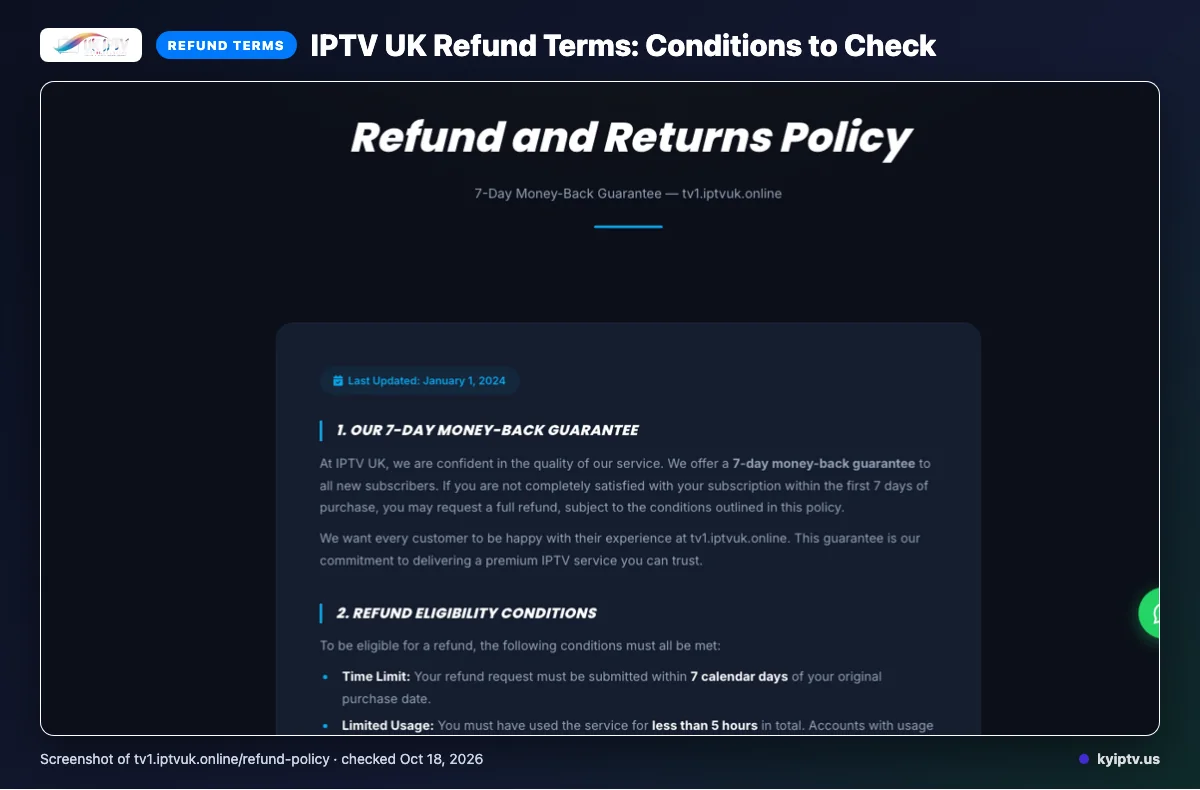
The refund policy offers a seven-day money-back guarantee for new subscribers. Requests must be made within seven calendar days, with under five hours of service use, a valid reason, and proof of purchase; first-time subscribers only, and other exclusions apply.
Listed payment methods:
- Credit / Debit Card
- PayPal
- Cryptocurrency
The phone and WhatsApp fields in the refund policy are blank. Save proof of purchase and review the full refund exclusions before paying.
The pros and cons of IPTV UK
IPTV UK lists multiple plan durations and connection choices, but some buying details need checking first. Treat its content and picture-quality statements as website claims, not independently verified results.
Pros
- Several plan durations, with one- or two-connection choices.
- The listed device range spans common streaming, TV, and mobile devices.
- Published content and picture-quality claims give you comparison points.
Cons
- App names are not listed on its website, so confirm the setup option for your device.
- A free trial is not stated on the pages checked.
- Refund eligibility has several conditions; review them before paying.
Quick tip: Mark each feature as listed or confirmed in your notes before buying.
Is IPTV UK safe and legal to use?
IPTV legality depends on content licensing and the laws where you use the service. The available details are not enough to label IPTV UK legal or illegal.
IPTV UK lists “industry-standard encryption,” but that phrase alone does not establish how subscriber data, payments, or account access are protected. Treat it as one stated security feature, not a complete safety assessment.
Look for clear licensing information for the specific content you intend to watch, including rights for your location. Review the payment terms, renewal conditions, and cancellation process before subscribing. If licensing details or terms are unclear, seek clarification rather than assuming the service is authorized or safe.
Getting started: how to sign up for IPTV UK and set it up
Start by checking your internet connection and device, then complete the signup process and follow the activation instructions provided. Keep your order confirmation nearby in case setup stalls.
Before you begin, have these ready:
- A stable internet connection.
- The device you plan to use, powered on and connected to the internet.
- Your order confirmation and any activation instructions.
- Open IPTV UK’s website and choose the subscription option that fits your needs.
- Complete the order and save your purchase confirmation.
- Follow the setup instructions provided after signup. Use the supplied account details in the recommended player or setup method.
- Open the service and try a live stream. Check that both the picture and audio play on your device.
If the service does not load, close and reopen the player first. Re-enter the supplied details carefully, then restart your device and internet router if needed. Avoid changing several settings at once; you will be able to tell which fix helped.
Before you contact support, note your device model, the player you used, the exact error message, and which steps you already tried. That information can help narrow down whether the problem is with the account, app, device, or connection.
KY IPTV vs IPTV UK: side by side
KY IPTV lists a 24-hour trial and device options for common streaming setups. Use the table to compare its terms with IPTV UK’s plan, trial, and refund details covered above.
| What to compare | KY IPTV | IPTV UK |
|---|---|---|
| Plans | One connection: 1 month $14.95; 3 months $29.95; 6 months $39.95; 12 months $59.95; 24 months $99.95. | See the plan table above. |
| Trial | 24-hour trial. | See the trial details above. |
| Refund | 7-day refund period. | See the refund conditions above. |
| Devices | Firestick / Fire TV, Android TV / Google TV, Samsung and LG Smart TV, Apple TV, iPhone, iPad, Roku, Xbox, PlayStation, Android phones, Windows, and Mac. | Refer to the device list above. |
Compare plan totals in their listed currencies; do not treat the dollar and pound amounts as direct equivalents. For device fit, start with the screen you use most, then check whether your other household devices appear on the relevant list.
KY IPTV also lists IPTV Smarters Pro, TiviMate, iPlayTV, IBO Player Pro, and Smart IPTV. IPTV UK’s app details were not listed in the earlier device summary, so use its published setup instructions when deciding which service fits your current setup.
Is IPTV UK right for you? Who should pick it and who should look elsewhere
IPTV UK is worth shortlisting if its published offer fits your viewing needs and household setup. It is not an automatic cable replacement; decide based on the details above and the requirements you cannot compromise on.
Pick IPTV UK if you have checked the listed terms against your budget, devices, and viewing priorities. It may suit you if you are comfortable making a decision from website information rather than requiring a hands-on playback check first.
- Choose it if the service details already covered match what you want to watch and how you plan to watch.
- Keep it on your shortlist if you can confirm any household-specific requirements before switching.
Look elsewhere if an unanswered detail could make the service unusable for you. You may also want another option if you need to verify playback on your own setup before committing, or if you are not ready to replace cable based on the information available.
Before you cancel, write down your must-haves and check each against the published terms. If any essential point is still unclear, get an answer before changing your TV plan.
If you want another option to compare, we invite you to try KY IPTV with its 24-hour trial before making the switch.
New to KY IPTV? See the setup guide, compare plans and prices, or check the channel list.
Frequently Asked Questions
What to check before switching
Match the plan to your connection needs, confirm your device setup, and review the refund conditions before paying.
Treat the channel and picture-quality figures as website claims; this review did not include a streaming test.
Want to compare with KY IPTV? Start the free 24-hour trial.