
Disclosure: KY IPTV sells its own IPTV service, and KY IPTV and Nitro IPTV share common ownership. Everything below comes from Nitro IPTV’s own website, read on October 10, 2026; no streaming tests were run.
This nitro iptv review finds four listed plans, from $14.95 to $59.95, with one connection at a time. Nitro IPTV lists support for several device categories, including smart TVs, Firestick, Android boxes, iOS devices, and PC.
Its website also lists live TV, VOD, IPTV Smarters, and an updated program guide, but its published content totals conflict. Compare its setup and terms with KY IPTV before choosing a cable replacement.
Nitro IPTV at a glance
Nitro IPTV presents itself as an IPTV service for viewers in the USA, UK, Canada, Europe, Asia, and MENA. Its listed device categories include televisions, streaming boxes and sticks, mobile devices, and computers.
That coverage may suit you if you live in one of those regions and want to watch IPTV on a device the service lists. Confirm your region before comparing plans.
Quick tip: Check the service’s listed regions against yours before weighing its offers.
What’s included with Nitro IPTV
Nitro IPTV lists live TV and VOD, several picture-quality labels, named devices, and IPTV Smarters. Its site says an updated EPG is available; catch-up is not listed.
See the earlier count note for its conflicting channel and VOD totals. Quality labels include 4K, HD, Full HD, FHD, and 4K Ultra HD; no streaming test was done.
Listed devices are Smart TVs, Android boxes, Firestick, MAG devices, iOS, and PC; IPTV Smarters is its named app. Compare those names with equipment you already use before choosing a plan.
The site lists anti-freeze technology, load balancing, a global CDN, adaptive routing, predictive content prefetch, and fast channel switching.
How much does Nitro IPTV cost? Plans and prices
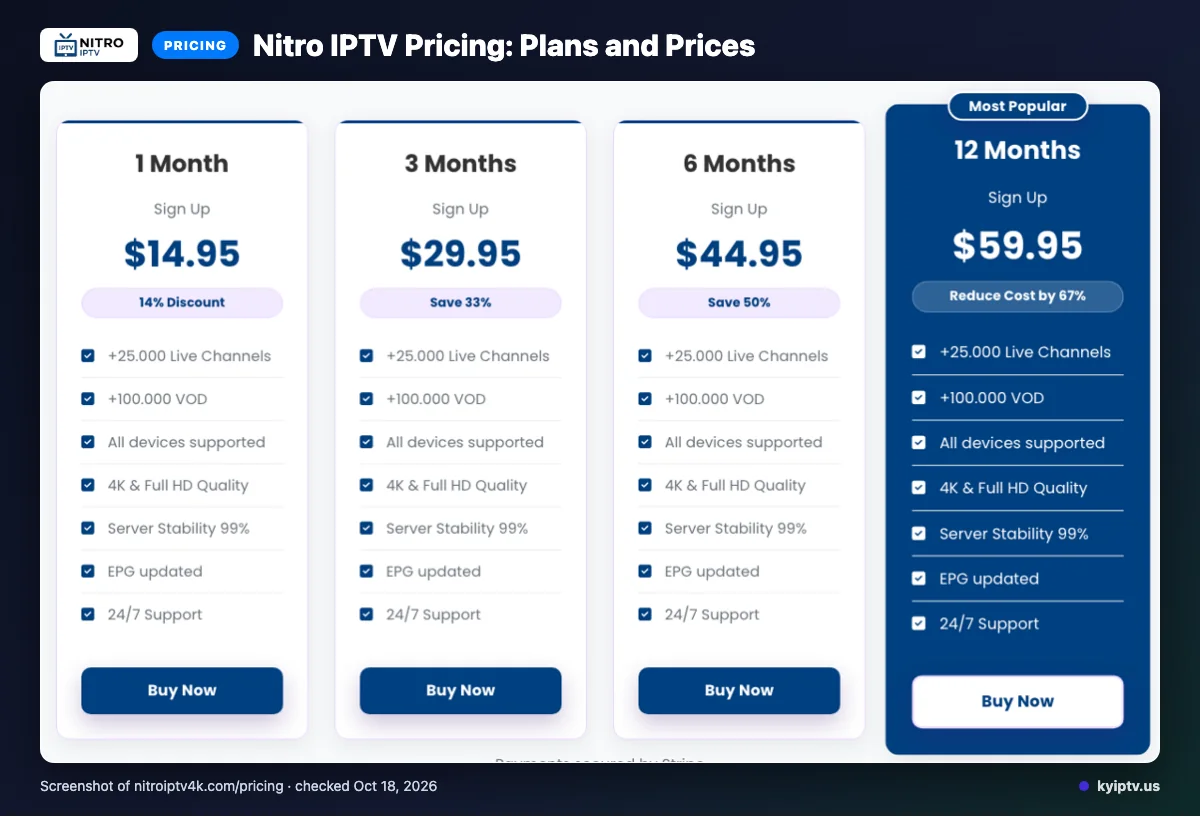
Nitro IPTV lists four plans, priced from $14.95 to $59.95 USD. Each plan allows a single connection at any given time.
Site checked: 2026-10-10
| Plan | Duration | Price in USD | Connections |
|---|---|---|---|
| 1 Month | 1 month | $14.95 | Single connection at a time |
| 3 Months | 3 months | $29.95 | Single connection at a time |
| 6 Months | 6 months | $44.95 | Single connection at a time |
| 12 Months | 12 months | $59.95 | Single connection at a time |
Quick tip: Choose a term only after checking whether one connection at a time fits your household’s viewing routine.
Nitro IPTV trial, refund policy and payment options
The pages checked do not list a free trial. Stated payment methods are Visa, MasterCard, American Express and PayPal.
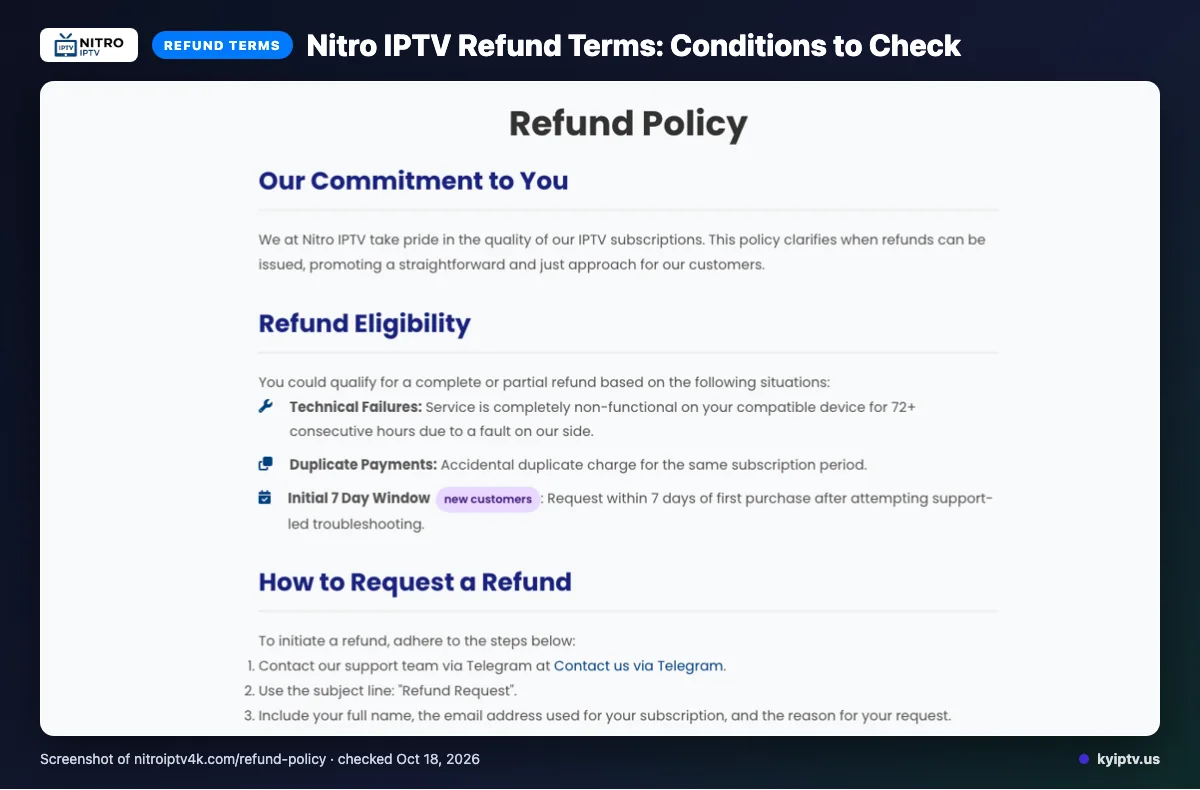
Refunds may be full or partial for a service failure lasting 72+ consecutive hours on a compatible device, duplicate payments, or a new customer request within 7 days after support-led troubleshooting.
Refunds exclude content dissatisfaction, slow or unstable internet, Terms of Service violations, and geo-blocking beyond Nitro IPTV’s control. Renewal requests are reviewed individually; the refund policy also contains unfilled payment-gateway placeholders.
Save your purchase receipt and support correspondence in case you need to request a refund.
The pros and cons of Nitro IPTV
Nitro IPTV lists several ways to contact support and says its service is not IP-locked. Weigh those conveniences against the site’s conditional terms and technical claims, which do not establish how well streams will work on your home network.
Pros
- Several support channels: You can contact the service by email, live chat, or Telegram. That gives you more than one route for account or setup questions.
- Not IP-locked: The site says the service is not tied to an IP address. That may matter if your viewing setup changes.
- The listed support options are clear, so you can choose a contact method before you subscribe.
Cons
- Website descriptions cannot confirm how streams will perform on your connection or devices. Treat technical claims as product information, not a guarantee of results.
- The refund page contains unfilled payment-gateway placeholders. That makes parts of its published policy less clear.
- Refund eligibility has conditions; use the policy summary above before deciding whether the terms fit your needs.
Is Nitro IPTV safe and legal to use?
You cannot confirm Nitro IPTV’s legal status or security from its offer pages alone. IPTV is a delivery method; legality depends on whether the provider has permission to distribute the content and on applicable local law.
We did not find licensing information on the pages checked, so you cannot use those pages to verify content rights. That does not establish whether the service is authorized or unauthorized. Check local rules and seek clear information about distribution rights before subscribing.
For safety, treat account details and payment information carefully. We could not verify the operator’s security practices from the available site information, so a service description is not a security guarantee.
- Read the privacy notice and terms before sharing personal details.
- Use a unique password for your streaming account.
- Install apps from sources you trust, and review requested permissions.
- Avoid sharing login details or entering payment information through unsolicited messages.
Also consider whether the service provides a clear way to contact support and explain account or billing issues. Nitro IPTV lists support options elsewhere on its site, but contact details alone cannot confirm licensing or protect your data.
If you cannot verify content rights or feel unsure about the information requested at checkout, pause before paying. Choose a service whose rights, privacy terms, and account protections you can assess.
Getting started: how to sign up for Nitro IPTV and set it up
Start with the provider’s signup instructions, then use the account details supplied after purchase to configure your player. Set up one device first and confirm it works before adding other screens.
What do you need?
- A device connected to the internet.
- A compatible IPTV player and the provider’s setup instructions.
- Your account details, kept available during setup.
How do you sign up and set it up?
- Visit Nitro IPTV’s website and follow its signup process. Review the selected option and the terms shown before completing payment.
- Save the purchase confirmation and any setup details you receive. If the instructions are unclear, ask support which player settings to enter.
- Install the player on your chosen device from a source you trust. Open it and follow the provider’s directions to add your account.
- Load the program guide, then check that the channel list appears. Try a few streams and confirm that audio and video play.
- Repeat the setup on another device only after the first one works. Follow the service’s connection terms when using more than one screen.
Quick tip: If playback stops, close and reopen the player, restart the device, and check your internet connection. Confirm your account details before changing app settings.
Before you call support, note your device, player, and the exact error message. That gives support a clear starting point for troubleshooting.
KY IPTV vs Nitro IPTV: side by side
KY IPTV and Nitro IPTV list different device options, while several plan prices align. Compare the details below, then match the service to the devices you already own.
| Feature | KY IPTV | Nitro IPTV |
|---|---|---|
| Plans | 1 month: $14.95; 3 months: $29.95; 6 months: $39.95; 12 months: $59.95. See KY IPTV pricing. | See the plan table above. Listed prices match at 1, 3, and 12 months; KY IPTV’s 6-month option costs less. |
| Trial | 24-hour trial. See trial details. | See the trial section above. |
| Refund | 7-day refund period. | See the refund summary above. |
| Devices | Fire TV, Android TV, Google TV, Samsung and LG Smart TVs, Apple TV, iPhone, iPad, Roku, Xbox, PlayStation, Android phones, Windows, and Mac. | See the device list above. |
For a household with different screens, compare the device lists against each TV, phone, or computer you plan to use. KY IPTV also lists several player apps, including IPTV Smarters Pro, TiviMate, iPlayTV, IBO Player Pro, and Smart IPTV.
Before choosing a longer plan, confirm that the device you use most often fits the service’s setup options. Then weigh the trial and refund terms already summarized above.
Is Nitro IPTV right for you? Who should pick it and who should look elsewhere
Nitro IPTV may fit if its published offer, setup, and terms match how your household watches TV. Treat it as a candidate to compare, not a guaranteed cable replacement.
Pick it if you are comfortable choosing from the information reviewed above and can use the service within its stated connection arrangement. Before paying, make sure the setup works for your household and that any feature you rely on is clearly covered.
Look elsewhere if everyone at home needs to watch different streams at the same time, or if you need firm answers about a feature before subscribing. The same applies if you prefer to judge a service through a trial before committing; use the trial and refund details already covered to guide that choice.
For your cable switch, compare the practical details that affect daily use: who watches, which screens they use, and what happens when a stream stops. If those basics do not line up, keep comparing rather than choosing on the offer alone.
Want to try another option on the devices you already own? We invite you to use KY IPTV’s 24-hour trial before deciding whether to switch.
Frequently Asked Questions
What to check before choosing Nitro IPTV
Before paying, confirm that your device and preferred player fit the listed setup, and review the single-connection limit and refund conditions. Treat the channel and VOD counts as conflicting website claims, not verified totals.
Compare the published plans and terms against how your household watches TV before switching.
Want to compare another option? Start the free 24-hour trial from KY IPTV.