
Disclosure: KY IPTV sells its own IPTV service, and KY IPTV and Pulse IPTV share common ownership. Everything below comes from Pulse IPTV’s own website, read on October 12, 2026; no streaming tests were run.
This pulse iptv review finds that Pulse IPTV lists broad device support and large channel and VOD libraries, but some buying details need clarification. Its standard plans allow one connection at a time.
Compare the listed features with your device, location, and viewing needs before you pay. If you’re weighing alternatives to cable, KY IPTV is another option to consider on the devices you already own.
Pulse IPTV at a glance
Pulse IPTV presents itself as an IPTV subscription for people considering an alternative to cable or satellite. Its website includes the USA among its stated regions, alongside the UK, Canada, Europe, Asia, and MENA.
That makes Pulse relevant to US cord-cutters comparing internet-delivered TV options. The site describes a service for live television and on-demand viewing, but this overview does not verify how streams perform in your home.
For this pulse iptv review, we looked at the provider’s published information rather than testing playback. Start with the official Pulse IPTV website to see how the company presents its service, then compare its specific terms and setup details before choosing.
Keep the distinction clear: website claims describe what a provider says it offers; they do not establish that the service fits your viewing habits or internet connection. The sections below break out the details you need to compare Pulse with a cable replacement.
Quick tip: Decide what you need from a TV service before comparing providers, so you can focus on the details that matter to your household.
What’s included with Pulse IPTV
Pulse IPTV lists 25,000+ live channels and 100,000+ VOD titles. Its site names 4K, HD, Full HD, FHD, and 4K Ultra HD quality labels.
Listed devices include Smart TVs, Android, iOS, Firestick, Android boxes, MAG devices, and PC. IPTV Smarters is the named app. The site describes an updated, user-friendly EPG and says you can catch up on trending series and fan-favorite shows.
Individual channel lineups and model-specific compatibility details are not listed. Other site text shows 150k+ VOD and a channel-list page title claiming 10,000+ live channels, unlike its other catalog claims.
Before subscribing, match the exact app name and device category against the site’s setup instructions.
How much does Pulse IPTV cost? Plans and prices
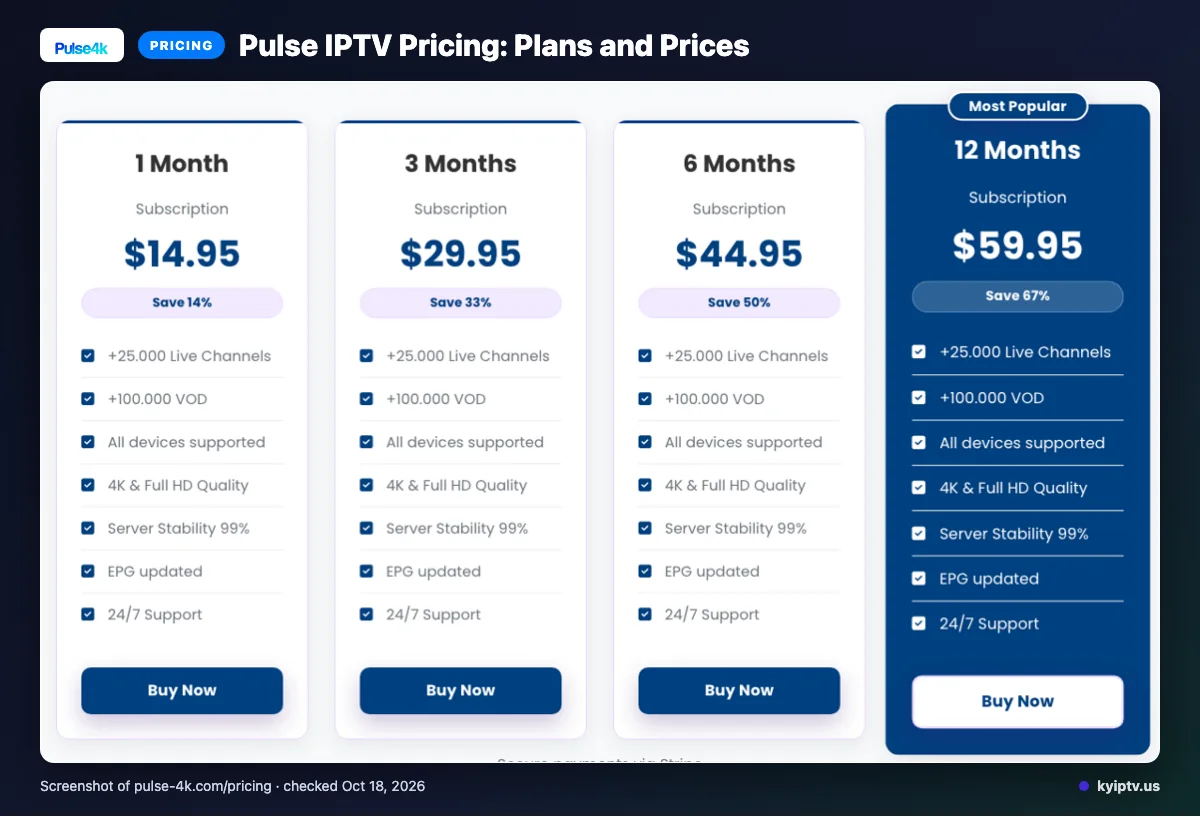
Pulse IPTV lists four subscription terms, priced in USD. We checked the site on 2026-10-12.
| Plan | Duration | Price | Connections |
|---|---|---|---|
| 1 Month Subscription | 1 Month | $14.95 | one connection at a time |
| 3 Months Subscription | 3 Months | $29.95 | one connection at a time |
| 6 Months Subscription | 6 Months | $44.95 | one connection at a time |
| 12 Months Subscription | 12 Months | $59.95 | one connection at a time |
Quick tip: Compare the term you expect to keep with its listed total price. Don’t assume a longer plan includes extra features.
Pulse IPTV trial, refund policy and payment options
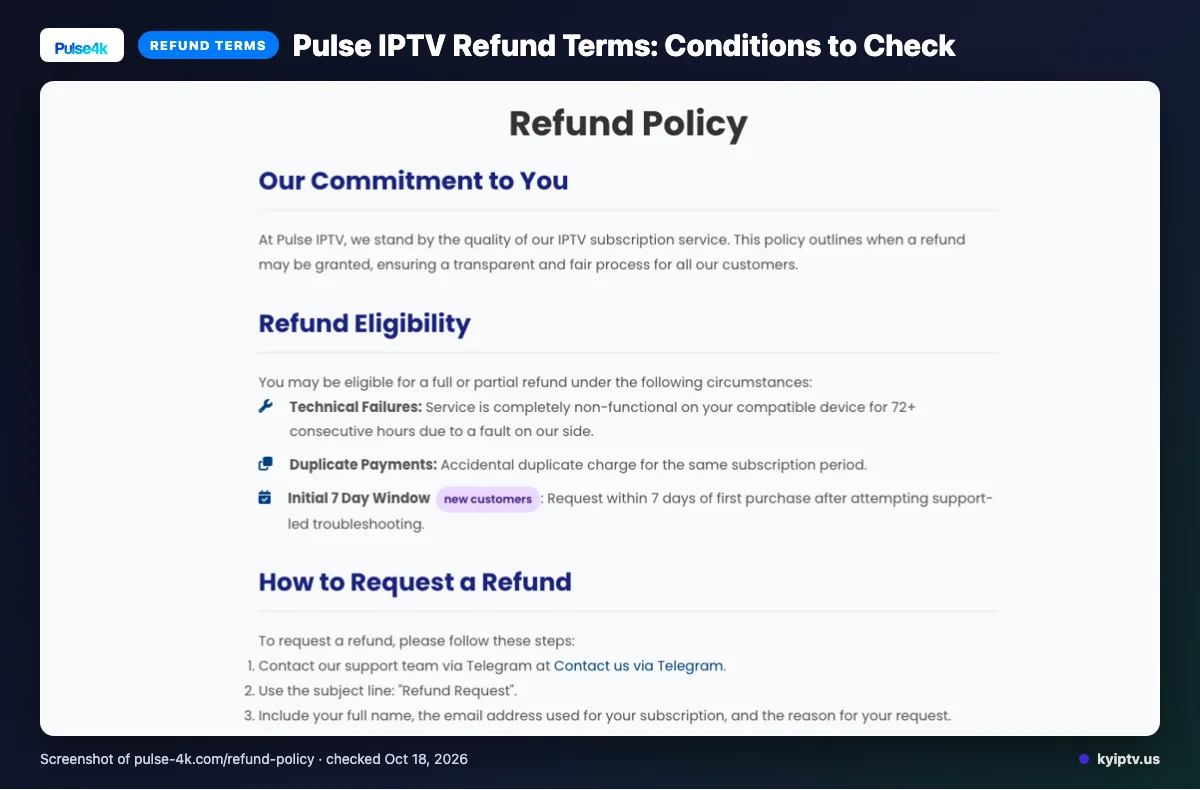
We did not find a free trial on the pages checked. The site lists Visa, MasterCard, American Express, PayPal, and Stripe as payment options.
Full or partial refunds may be available under the policy’s stated conditions. Some situations are excluded, and renewal refund requests are assessed case by case.
Keep support correspondence and payment records together if you need to discuss a refund request.
The pros and cons of Pulse IPTV
These points reflect website claims and information gaps, not tested performance or customer experience. Weigh them against your own device and viewing needs.
Pros
- The earlier feature list gives you quality labels and named device and app options to compare with your setup.
- The EPG and catch-up descriptions outline useful viewing tools.
Cons
- The catalog-count mismatch noted earlier makes the advertised scope harder to assess.
- The trial gap noted earlier leaves less room to check fit first.
- No channel-by-channel lineup or model-level compatibility details are listed.
Quick tip: Treat listed features as website claims, not confirmation that a specific program or device setup will work for you.
Is Pulse IPTV safe and legal to use?
Legality depends on content licensing and local law, so we can’t make a legal conclusion about Pulse IPTV. Before paying for any IPTV service, check the rules where you live and confirm you have permission to access the content available in your location.
Account and device security are separate issues. Use a unique password, keep your device and apps updated, and avoid sharing login details; these steps don’t determine whether content access is permitted.
Getting started: how to sign up for Pulse IPTV and set it up
Review the offer and setup information before subscribing. Use Pulse IPTV’s official site for current checkout instructions.
What you need: A device and app covered by the site’s device information, plus your account details.
- Read the plan and policy details before choosing a subscription.
- Use the site’s current checkout and follow its instructions for receiving your account details.
- Install or open the listed app on a covered device, then enter your details as instructed.
- Open the guide and check the channels or catch-up options you plan to use.
Before contacting support, gather your device model, app name, and a clear description of the issue. Note the exact screen or setup step where the process stops so you can explain the problem.
KY IPTV vs Pulse IPTV: side by side
Both list one-connection plans, and their device categories overlap. Compare the term, trial and refund details, then check the exact device you plan to watch on.
| Detail | Pulse IPTV | KY IPTV |
|---|---|---|
| Plans | Four terms: 1, 3, 6 and 12 months; prices are listed above. Each allows one connection at a time. | One-connection plans: 1 month $14.95; 3 months $29.95; 6 months $39.95; 12 months $59.95; 24 months $99.95. |
| Trial | We did not find a free trial on the pages checked. | 24-hour trial. |
| Refund | See the refund conditions summarized above. | 7-day refund term. |
| Devices | Smart TVs, Android, iOS, Firestick, Android boxes, MAG devices and PC. | Fire TV, Android and Google TV, Samsung and LG Smart TVs, Apple TV, iPhone, iPad, Roku, Xbox, PlayStation, Windows and Mac. |
Device labels cover broad categories, not every model. Confirm your specific device before choosing a plan.
Is Pulse IPTV right for you? Who should pick it and who should look elsewhere
Pulse IPTV may suit you if your device fits its published categories and you’re comfortable reviewing the provider’s claims before subscribing. Its listed offer gives you a basis for comparison, but it may not answer every household’s questions.
If you need a confirmed local channel lineup or exact model compatibility, get those answers before paying. If a clearly stated trial matters to you, compare services that publish one.
Quick tip: Write down your must-have device and content requirements before choosing a plan. Use that list to check each provider’s published details.
If you want another option to consider, we invite you to look at KY IPTV’s 24-hour trial.
New to KY IPTV? See the setup guide, compare plans and prices, or check the channel list.
Frequently Asked Questions
Can I use one Pulse IPTV connection on a phone and a TV at the same time?
No. Each listed Pulse IPTV plan allows one connection at a time, so the standard plan does not allow simultaneous streaming on a phone and TV. The site says add-on connections are available. Before paying, ask Pulse about the add-on price and how to add another connection.
Does the listed subscription price include setup or activation fees?
We did not find setup or activation fee details on the pages checked. The listed prices cover the subscription terms, but they do not establish whether other charges apply. Review the final checkout total and ask Pulse about any separate setup or activation cost before paying.
Can I cancel a Pulse IPTV subscription online?
We did not find information establishing whether you can cancel online. The published refund policy describes some eligible refund requests, but cancellation and renewal terms are separate details. Before subscribing, ask Pulse how to stop renewal, when cancellation takes effect, and whether you need to contact support.
Does Pulse IPTV publish a channel lineup for each region?
Pulse names the USA, UK, Canada, Europe, Asia, and MENA as regions. We did not find a region-by-region channel lineup on the pages checked, so the general channel-count claim does not show which channels are available where you live. Ask Pulse for the lineup for your location before subscribing.
What details should I give support if setup does not work?
Pulse lists email, live chat, and Telegram support. Include the device you are setting up, the app you selected, the exact error message, and when the issue began. Also describe your internet connection status and the steps you have already tried; these details can help support understand the problem.
What to check before choosing Pulse IPTV
Pulse IPTV lists four plan terms, one connection at a time, and support for several device categories. Before paying, confirm the channel lineup for your region, any extra connection costs, and the cancellation process.
We invite you to start the free 24-hour trial from KY IPTV.