
Disclosure: KY IPTV sells its own IPTV service, and KY IPTV and Sapphire IPTV share common ownership. Everything below comes from Sapphire IPTV’s own website, read on October 12, 2026; no streaming tests were run.
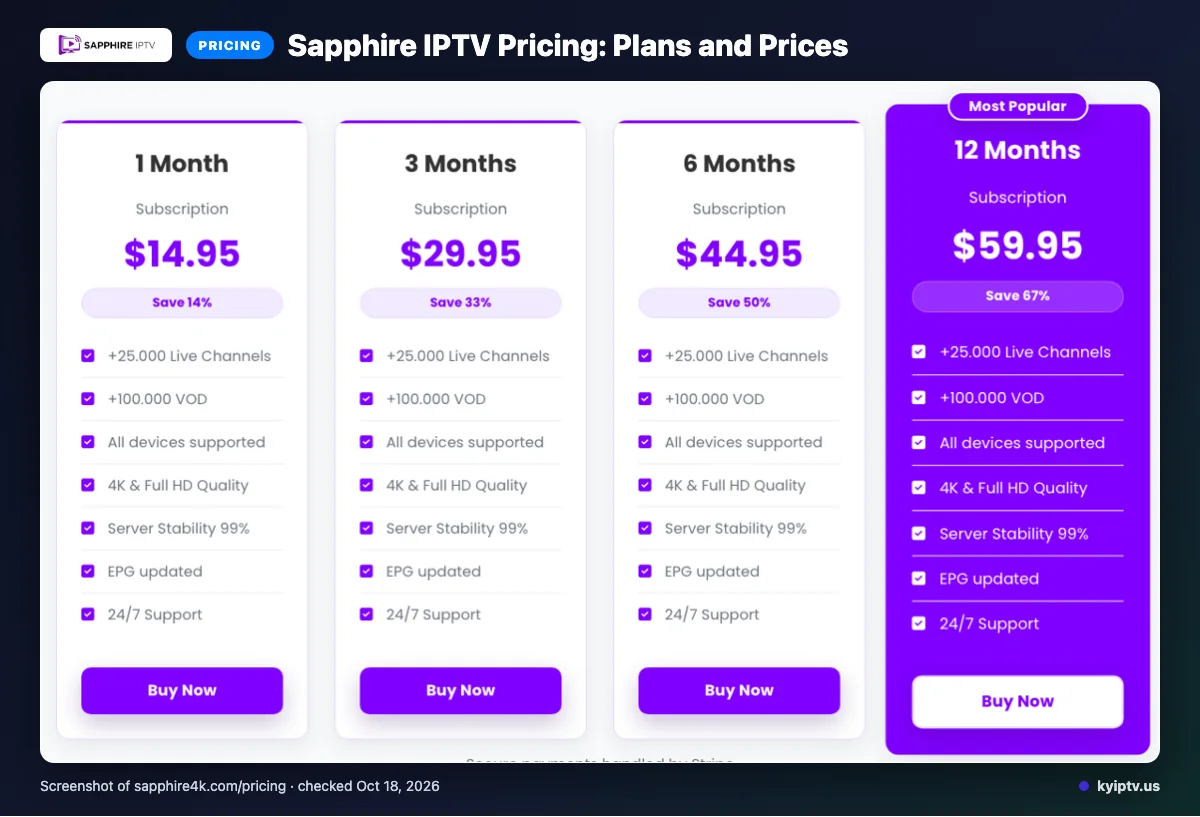
This sapphire iptv review finds a clear plan lineup, but you should verify the terms and device fit before paying. Sapphire lists four plan lengths, one connection at a time, and prices from $14.95 to $59.95.
The pages were checked on 2026-10-12; the site shows dollar signs but does not name the currency. KY IPTV is another option, with published plans and a free 24-hour trial.
Sapphire IPTV at a glance
This sapphire iptv review summarizes the provider’s website for cord-cutters comparing paid TV options. Sapphire IPTV lists service for the USA and other regions; review its terms before choosing a plan.
We checked the Sapphire IPTV website on 2026-10-12. The site shows four plan lengths, each with one connection at a time; it does not explicitly identify the currency represented by the dollar sign.
| Plan length | Listed price | Connections |
|---|---|---|
| 1 Month | $14.95 | One connection at a time |
| 3 Months | $29.95 | One connection at a time |
| 6 Months | $44.95 | One connection at a time |
| 12 Months | $59.95 | One connection at a time |
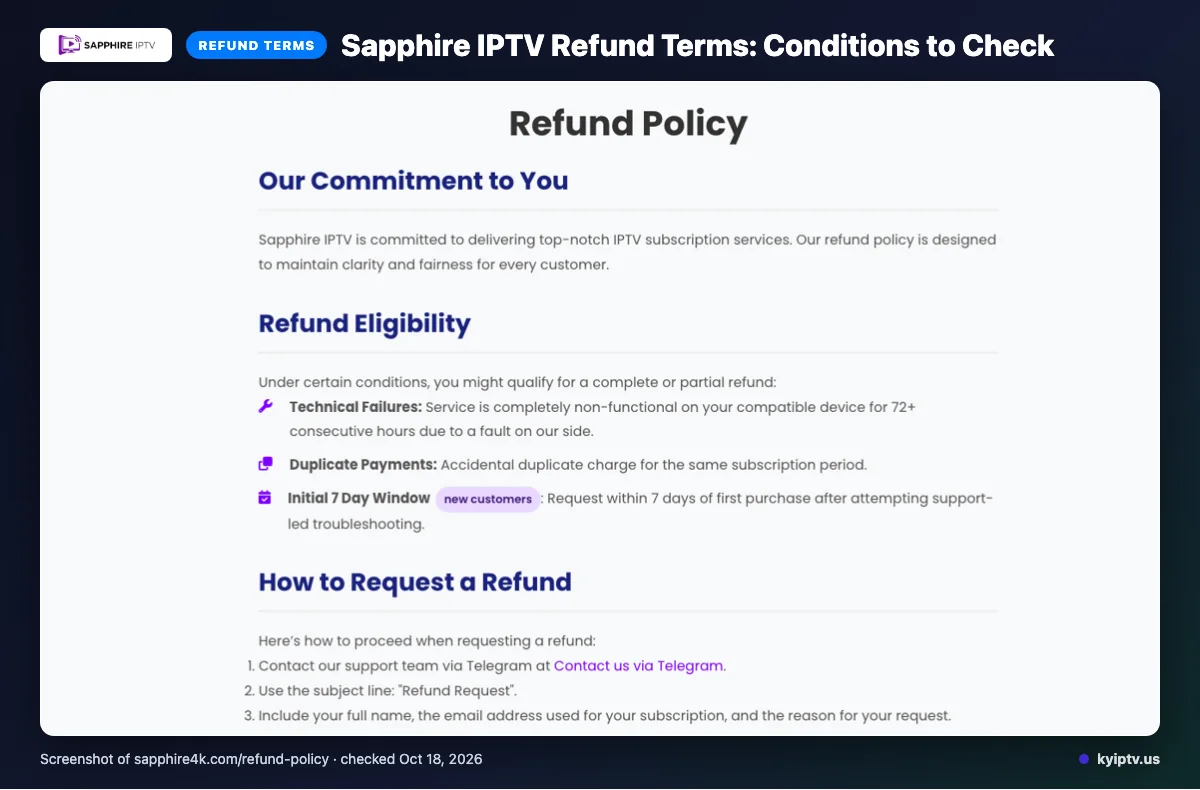
A free trial was not listed on the website pages checked. Refunds may apply to qualifying service failure lasting 72 or more consecutive hours, duplicate payments, or eligible new-customer requests within seven days after support-led troubleshooting. Change-of-mind refunds are typically unavailable after that period; renewals are reviewed case by case. Content dissatisfaction, slow or unstable internet, terms violations, and external geo-blocking are excluded. Approved refunds are processed within three business days; bank arrival may take five to ten business days.
The listed payment options are Visa, MasterCard, American Express, and PayPal. The site lists multiple plan lengths, payment options, device categories, video-quality labels, an EPG, and several delivery technologies. Its VOD counts differ, and catch-up and a free trial were not listed on the pages checked.
Legality depends on content licensing and local law; website claims alone do not establish the licensing status of every program. Review the provider’s terms and use payment methods you are comfortable with. Choose a listed plan and review its connection terms before subscribing.
For a cable switch, compare the listed terms with your household’s viewing needs. We invite you to try KY IPTV’s 24-hour trial before you decide.
What’s included with Sapphire IPTV
Sapphire lists live TV, on-demand content, several video-quality labels, device categories, and an updated EPG. Its published channel and VOD counts are covered earlier; see the Sapphire IPTV website for its feature descriptions.
The listed quality labels include 4K, HD, FHD, Full HD, and 4K Ultra HD. These are website claims, not a guarantee that every program is available in each quality.
Match the listed device categories to the screen you plan to use. The site names Smart TVs, Android devices and boxes, Firestick, MAG devices, iOS, PC, and Apple devices.
- App: IPTV Smarters is the named app.
- Guide: The site describes an updated Electronic Program Guide, or EPG, for browsing the channel list.
- Catch-up: The site does not state whether catch-up viewing is available.
Before switching, check that your intended device fits one of the listed categories and that you can use the named app. The site also describes Global CDN and anti-freeze technology, plus Predictive Content Prefetch, which it says preloads segments and channels you are likely to watch.
These descriptions tell you what Sapphire advertises, but they do not confirm how a particular channel or feature will perform on your home network. Compare the listed quality labels and device categories with your setup before choosing a service.
How much does Sapphire IPTV cost? Plans and prices
| Plan | Listed price | Connections |
|---|---|---|
| 1 Month | $14.95 | One connection at a time |
| 3 Months | $29.95 | One connection at a time |
| 6 Months | $44.95 | One connection at a time |
| 12 Months | $59.95 | One connection at a time |
Quick tip: Confirm the currency and final checkout total before paying.
Sapphire IPTV trial, refund policy and payment options
We did not find a free trial listed on Sapphire IPTV’s website pages.
For refund eligibility, refer to the limited conditions summarized above. The policy excludes dissatisfaction with content, slow or unstable internet, Terms of Service violations, and geo-blocking outside the provider’s control.
Renewal refunds are decided case by case. After approval, refunds are processed within 3 business days; funds may take 5–10 business days to appear.
Before checkout, save the terms shown and any support correspondence. Keep those records if you need to request a refund after troubleshooting with support.
The pros and cons of Sapphire IPTV
Sapphire IPTV lists several plan lengths, payment options, and delivery technologies. The drawbacks are inconsistent VOD figures and missing details buyers may want before subscribing.
- Pros: The site describes several plan choices and payment options.
- Pros: It lists delivery technologies, including a global CDN and predictive prefetching.
- Cons: The VOD counts differ, as noted above.
Quick tip: Ask the provider: Is a trial available? Does catch-up viewing work? Which VOD count applies to your plan?
Is Sapphire IPTV safe and legal to use?
The pages reviewed are not enough to declare Sapphire IPTV legal, illegal, or safe.
Check licensing information for the specific content you plan to watch, not just the service’s general description. Read the provider’s terms, including renewal and cancellation language, and choose a payment method you are comfortable using. Keep your account details private and avoid installing files from sources you cannot verify.
Getting started: how to sign up for Sapphire IPTV and set it up
Choose a listed plan, review its connection terms, and follow the signup instructions. Sapphire says setup typically takes under 5 minutes, but your timing may vary.
Before you start, have your selected plan, payment method, device, and internet connection ready.
- Open Sapphire IPTV’s official site, choose a plan, and review its connection terms before checkout.
- Choose a payment method listed on the site and follow the instructions shown during signup.
- Install IPTV Smarters on a compatible device, then follow Sapphire’s setup instructions in the app.
Subscriptions renew automatically at the end of each billing period. Change or end renewal settings through your account dashboard.
Quick tip: Before contacting support, have your device, app, and the step where setup stopped ready to describe.
KY IPTV vs Sapphire IPTV: side by side
The useful comparison is how each service fits your budget, payment decision, and devices. Sapphire’s plan and refund details are summarized earlier; the table below avoids repeating them.
| Compare | KY IPTV | Sapphire IPTV |
|---|---|---|
| Plans | 1 month: $14.95; 3 months: $29.95; 6 months: $39.95; 12 months: $59.95; 24 months: $99.95. See plan details. | See the plan table above, or review Sapphire’s website. |
| Trial | 24-hour trial. See trial details. | Trial information is covered above. |
| Refund | Review the KY IPTV refund policy. | Refund conditions are covered above. |
| Devices | Fire TV, smart TVs, Apple devices, Roku, consoles, phones, and computers. | Smart TVs, Android devices, Firestick, MAG devices, iOS, and computers. |
For device fit, compare the exact model you plan to use with the setup details already covered. For Sapphire’s current terms, read its website before paying.
Is Sapphire IPTV right for you? Who should pick it and who should look elsewhere
Sapphire IPTV may suit you if its listed regional TV listings match what you want; look elsewhere if they do not. The official site presents it as an IPTV offering for viewers seeking regional programming.
Its listed regions include the USA, UK, Canada, Europe, Asia, and MENA, with categories for France, Turkey, Greece, Belgium, Netherlands, Arabic, Latin America, India, and Germany. These listings do not mean every option is available everywhere. This review checks website claims, not streaming performance.
Quick tip: Compare the regions named on the site with the programming you want before choosing a plan.
Frequently Asked Questions
What internet speed does Sapphire IPTV require?
Sapphire’s pages checked for this review do not state a minimum internet speed. Before subscribing, check your connection on the device and network you plan to use, then compare the result with your household’s other streaming and internet use. A speed figure for one household would not establish a requirement for every setup.
Can I use Sapphire IPTV with a VPN?
The pages checked do not state whether Sapphire IPTV supports VPN use. Sapphire says it has no IP restrictions and that streaming is available globally, but that statement does not confirm VPN compatibility. If VPN use matters to you, ask its support team before paying; its listed options include email, live chat, and Telegram.
Does Sapphire IPTV include local broadcast stations?
The pages checked do not confirm that Sapphire includes local broadcast stations. Sapphire lists the USA among its regions and includes regional listings, but the pages reviewed do not identify specific local stations. If local news or network broadcasts matter, ask support to confirm availability for your area before choosing a plan.
Can I use Sapphire IPTV while traveling?
Sapphire says its service has no IP restrictions and is available from anywhere globally, so its website presents travel access as available. That is a provider claim, not a guarantee about every network or location. Check applicable local rules and confirm access with Sapphire support before relying on it while away from home.
Where can I find the setup instructions after ordering?
The pages checked do not say where setup instructions appear after an order. Sapphire says setup typically takes under 5 minutes and lists support through email, live chat, and Telegram. If the instructions are not in your order communication, contact one of those support options and include your device type and plan.
Check the Details Before You Choose
Before subscribing, compare your device with Sapphire’s listed categories, confirm that its regional listings fit what you watch, and review the terms. The site says subscriptions renew automatically, with renewal settings available through the account dashboard.
Want to compare another option? Start the free 24-hour trial with KY IPTV.