
Disclosure: KY IPTV sells its own IPTV service, and KY IPTV and VibeFlix TV share common ownership. Everything below comes from VibeFlix TV’s own website, read on October 11, 2026; no streaming tests were run.
This VibeFlix TV review finds a service listing live TV, on-demand titles, and support for several device types. Check its device list and single-connection plans against your setup before switching from cable.
VibeFlix TV lists a four-hour trial, while KY IPTV offers a 24-hour trial. Compare the trial terms and device fit before choosing.
VibeFlix TV at a glance
VibeFlix TV is an IPTV service described on its official site as offering live-channel and VOD access. Its listed regions are the USA, UK, Canada, Europe, Asian regions, and MENA.
That makes it relevant to cord-cutters in those markets who are comparing internet-delivered TV with cable or satellite. The site’s regional list gives you a starting point, but it does not tell you whether the service fits your specific viewing needs.
The site uses different channel-count wording: it displays “30k+ Channels,” while most channel claims say “25,000+.” Keep that distinction in mind when reviewing its overview; the figures are website claims, not a measure of what you will personally watch.
This is a website-based review, not a streaming test. Use the remaining sections to check the listed plan terms, trial and refund details, and device fit before deciding whether to switch. That keeps the decision focused on what the service states and what matters in your home.
VibeFlix TV’s headline offer is aimed at people seeking live TV and on-demand viewing through an IPTV subscription. If you are moving away from a traditional provider, compare the published terms with your household’s needs before replacing your current service.
What’s included with VibeFlix TV
VibeFlix TV lists live channels and on-demand titles; their stated counts are covered above. Its device list includes smart TVs, streaming devices, phones, tablets, and computers, with four named IPTV apps.
The listed video options include 4K, 4K HDR, Ultra HD, Full HD, FHD, and HD. These are website claims, not results from a playback test.
Which devices and apps are listed?
Named devices include Smart TVs, Android TV and boxes, Android phones and tablets, Amazon Fire Stick, Fire TV, MAG devices, iPhone, iPad, Apple TV, PC, and Mac. The site lists IPTV Smarters Pro, GSE Smart IPTV, Flex IPTV, and IPTV Extreme.
The site does not match each app to each device. Before switching, compare your device and preferred app with the setup instructions you receive.
Does VibeFlix TV include an EPG or catch-up?
VibeFlix TV describes an updated, simple-to-use Electronic Program Guide, or EPG, for browsing scheduled programming. The supplied site information does not state a catch-up feature, so don’t assume you can replay missed programs.
For a cable switch, confirm that your chosen app works with your device and that the guide suits how you browse live TV. Device and app names show what VibeFlix TV lists, but do not establish that every combination works.
How much does VibeFlix TV cost? Plans and prices
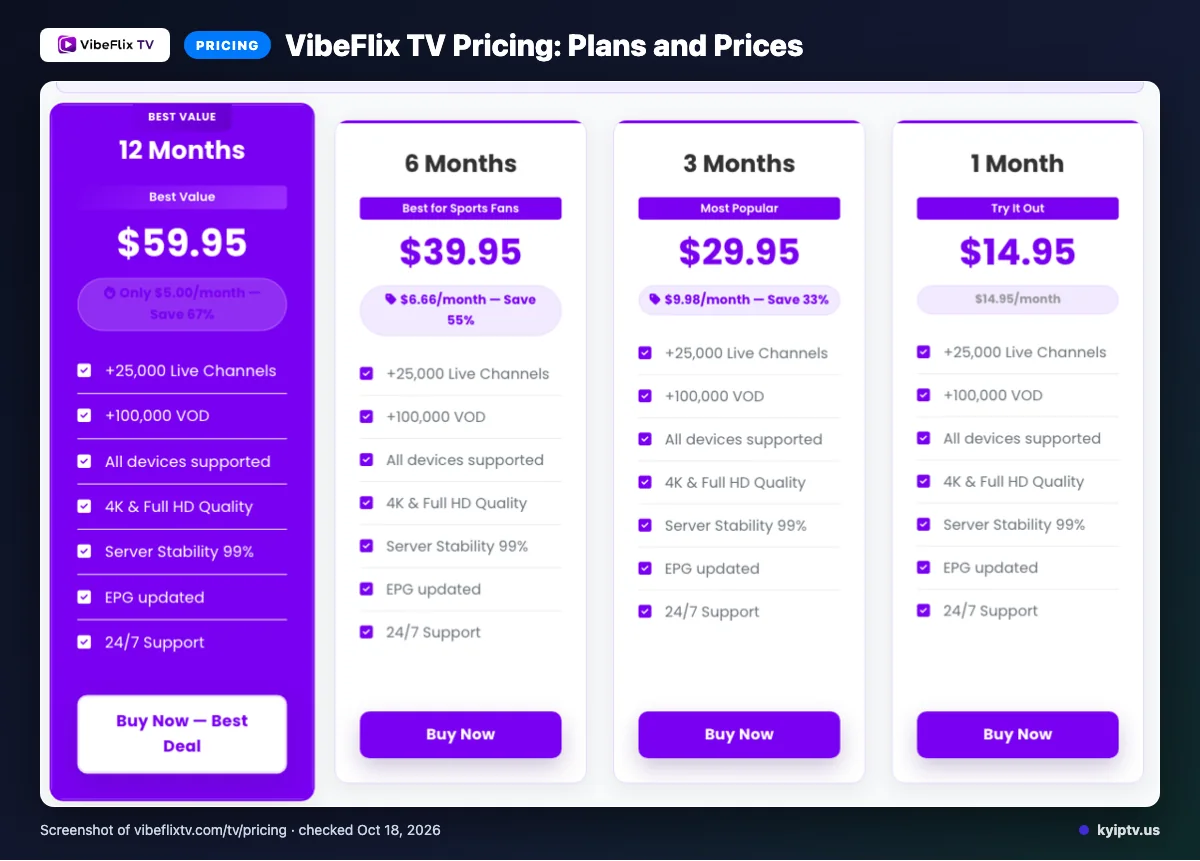
VibeFlix TV lists plans from $14.95 for one month to $99.95 for 24 months, each with one active connection. KY IPTV lists the same term prices for one connection; VibeFlix TV’s trial is four hours, compared with KY IPTV’s 24 hours.
VibeFlix TV details checked October 11, 2026.
| Details | VibeFlix TV | KY IPTV |
|---|---|---|
| Plans | Starter: 1 month, $14.95; Standard: 3 months, $29.95; Premium: 6 months, $39.95; Best Value: 12 months, $59.95; Diamond: 24 months, $99.95. Each lists 1 active connection. | 1 month: $14.95; 3 months: $29.95; 6 months: $39.95; 12 months: $59.95; 24 months: $99.95. One connection. |
| Trial | 4-hour free trial | 24-hour trial |
| Refund | Refund Policy is linked; terms are not stated in the supplied text. | 7-day refund period |
| Devices | Smart TVs; Android TV/Box and phones/tablets; Fire Stick and Fire TV; MAG; iPhone, iPad, Apple TV; PC and Mac. | Firestick/Fire TV; Android TV/Google TV and phones; Samsung and LG Smart TV; Apple TV, iPhone, iPad; Roku; Xbox; PlayStation; Windows and Mac. |
Quick tip: Compare the devices you plan to use, rather than choosing by the longest device list.
VibeFlix TV trial, refund policy and payment options
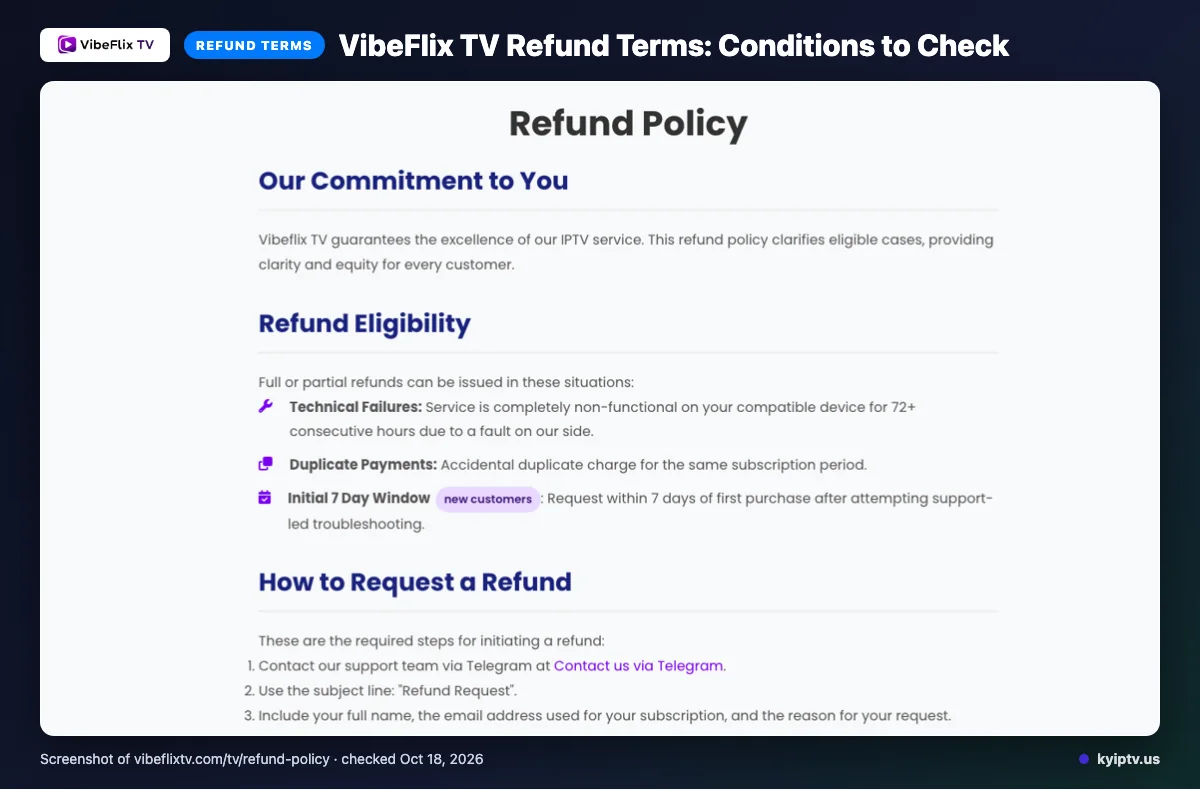
VibeFlix TV lists a 4-hour free trial. The site links to a Refund Policy, but its terms are not stated in the supplied text.
The payment methods listed are:
- Visa
- Mastercard
- American Express
- PayPal
- BTC / USDT
- Western Union
- Bank Transfer
- CashApp
- crypto
Read the refund policy itself before checkout, since its terms are not provided in the reviewed text.
The pros and cons of VibeFlix TV
VibeFlix TV lists useful support and account tools, but its subscriptions auto-renew. Its routing and delivery claims are not a substitute for judging how a stream works on your connection.
What are the pros?
-
Several support routes: You can contact support by email, live chat, or Telegram. That gives you more than one listed way to ask for help.
-
Account cancellation: The site says you can cancel from your account dashboard. That gives you a stated way to manage renewal yourself.
-
Listed delivery features: VibeFlix TV describes anti-freeze load balancing, adaptive routing, and a global CDN. These are provider claims, not a guarantee of performance in your home.
-
Activation claim: The site advertises instant activation. That may appeal if you want to start soon after subscribing.
What are the cons?
-
Auto-renewal requires attention: The site says subscriptions renew at the end of each billing cycle. If you do not want another cycle, cancel through your dashboard.
-
Performance is not independently verified here: This is a website-based review, not a streaming test. The listed routing and server claims cannot show how the service will perform on your internet connection.
-
Renewal depends on account management: Cancellation is described as a dashboard task, so keep your login details available if you plan to stop future billing.
Is VibeFlix TV safe and legal to use?
The supplied information does not establish whether VibeFlix TV has rights to distribute its programming, so its legal status cannot be confirmed here. IPTV is a delivery method; legality depends on content rights and the laws where you watch.
Does the available information confirm VibeFlix TV is licensed?
No licensing details are included in the supplied facts. Before subscribing, review the VibeFlix TV site for clear information about the business and its content rights, and ask the provider directly if anything remains unclear.
How can you reduce account and payment risk?
The supplied facts do not document an independent security review or explain how account data is handled. Read the privacy and service terms before sharing personal or payment information, and use a payment method with protections you understand.
Use a unique password for the account, avoid sharing login details, and keep your device software current. Be cautious with app downloads: use sources you trust, check the requested permissions, and do not install files sent by an unfamiliar contact.
What should you check before subscribing?
- Can you find clear terms covering content rights, privacy, and account use?
- Can you identify the provider and contact it with questions?
- Do you understand the payment and cancellation terms before paying?
If you cannot confirm the details that matter to you, pause before paying. A service’s website claims alone do not prove licensing or security.
Getting started: how to sign up for VibeFlix TV and set it up
Start on VibeFlix TV’s official signup page, choose a plan, and follow the instructions provided. Before you begin, make sure you can access your email and have your viewing device nearby.
What you need:
- An email account you can access
- Your viewing device and internet connection
- Time to follow the signup and setup instructions
How to get started:
- Review the plan details from the pricing section, then select the option that fits your intended subscription period.
- Enter the requested account details carefully. Use an email address you can open, since you may need it for order or setup information.
- Follow the checkout prompts and keep the confirmation page until setup is complete.
- Check the confirmation page and your email for account details or setup instructions. Follow those instructions to connect your subscription in your chosen player.
- Open the service and confirm that your account loads. If setup fails, note the error message and when it appears before trying again.
Quick tip: Keep your order confirmation and setup instructions together so you can find them quickly if you need help later.
Before you call support, restart the player and your internet equipment, then try again. If the issue remains, provide the support team with your order confirmation and the exact error message.
KY IPTV vs VibeFlix TV: side by side
Both services list one active connection at matching plan prices. Compare the trial, refund details, payment methods, and devices before choosing.
| Details | VibeFlix TV | KY IPTV |
|---|---|---|
| Plans | Starter: 1 month, $14.95; Standard: 3 months, $29.95; Premium: 6 months, $39.95; Best Value: 12 months, $59.95; Diamond: 24 months, $99.95. Each lists one active connection. See the VibeFlix TV listing. | 1 month: $14.95; 3 months: $29.95; 6 months: $39.95; 12 months: $59.95; 24 months: $99.95. One connection. |
| Trial | 4-hour free trial | 24-hour trial |
| Refund | The site links to a Refund Policy, but its terms are not stated in the supplied text. | 7-day refund period |
| Devices | Smart TVs; Android TV / Box and phones/tablets; Amazon Fire Stick; Fire TV; MAG devices; iPhone; iPad; Apple TV; PC; Mac. | Firestick / Fire TV; Android TV / Google TV; Samsung and LG Smart TV; Apple TV / iPhone / iPad; Roku; Xbox; PlayStation; Android phones; Windows / Mac. |
| Payment methods | Visa, Mastercard, American Express, PayPal, BTC / USDT, Western Union, Bank Transfer, CashApp, and crypto. | Card (via Binance gift card), Cash App, and crypto (BTC / USDT). |
Choose by the devices you plan to use and the terms you prefer. We invite you to try KY IPTV with a 24-hour free trial before switching from cable.
Is VibeFlix TV right for you? Who should pick it and who should look elsewhere
VibeFlix TV may suit you if you want IPTV with live television and on-demand titles.
The service could fit cord-cutters in those regions comparing live TV and VOD options. Look elsewhere if you need details the site does not provide for your specific setup. Review the official VibeFlix TV site before deciding.
Quick tip: Before comparing plans, decide which devices in your home you want to use. Then match that list against the device details covered earlier.
Want to compare another option before leaving cable? We invite you to try KY IPTV with a 24-hour free trial.
New to KY IPTV? See the setup guide, compare plans and prices, or check the channel list.
Frequently Asked Questions
What support channels does VibeFlix TV list?
VibeFlix TV lists support by email, live chat, and Telegram. The supplied details do not state support hours or response times. Before subscribing, consider which listed contact method you can use if you need help with account access or setup.
Does VibeFlix TV list Roku as a supported device?
Roku does not appear in the device list on the pages checked for this review. The listed devices include smart TVs, Android TV and Box, Fire Stick, Apple TV, phones, tablets, PC, and Mac. That list alone does not establish whether Roku works with the service.
Are supplementary connections available?
Yes. VibeFlix TV states that supplementary connections are available. Its regular subscription plans list one active connection, so review the account options if you need to use the service on more than one connection at once.
Does the site state a price for supplementary connections?
We did not find a price for supplementary connections in the supplied site information. The listed plan prices cover subscriptions with one active connection. Ask VibeFlix TV about the cost and terms before paying if you need additional connections.
Can I use VibeFlix TV on more than one active connection?
Each listed regular plan includes one active connection. VibeFlix TV also says supplementary connections are available, but the supplied details do not give their price or terms. Confirm those details with the service if you want to watch on multiple active connections.
Check your device and connection needs
VibeFlix TV lists several device types and offers plans with one active connection. Check that your viewing device fits the listed options, then confirm supplementary connection terms directly if you need more than one.
Want a longer trial to check device fit? Start the free 24-hour trial from KY IPTV.