
Disclosure: KY IPTV sells its own IPTV service, and KY IPTV and YourFlix IPTV share common ownership. Everything below comes from YourFlix IPTV’s own website, read on October 10, 2026; no streaming tests were run.
This yourflix iptv review finds advertised live TV, on-demand titles, and plans from $14.95 to $59.95. The website gives conflicting channel and VOD totals, and its dollar prices do not name a currency.
Check the device list, one-active-connection limit, and refund terms before paying. KY IPTV is another option if you want to compare services for the devices you already own.
YourFlix IPTV at a glance
YourFlix IPTV is an IPTV service you can assess as a possible alternative to cable or satellite. Its official website is the place to review its offer before deciding whether it fits your household.
This overview is for cord-cutters who want to check the provider’s terms before changing how they watch TV. Start by identifying what matters most to you, such as the cost structure, account limits, payment choices, and the support route. Those details help you compare services without relying on broad promises.
Use this review as a starting point, then read the provider’s own terms before paying. A service’s fit depends on the conditions it publishes and what you need at home. If you are replacing a cable package, compare those terms with the parts of your current setup you plan to keep.
This review focuses on information published by YourFlix IPTV, not a hands-on assessment. Use the later sections to check its plans, policies, and setup details against your priorities before making a decision.
What’s included with YourFlix IPTV
YourFlix lists live TV and on-demand content, several video-quality labels, and support for multiple device types. Its website also names IPTV Smarters and describes an updated EPG for browsing channels.
For the advertised channel and VOD counts, see the at-a-glance section. YourFlix lists 4K, HD, Full HD, FHD, 4K Ultra HD, and Ultra-HD; these are service claims, not verified playback results.
Which devices and app does YourFlix list?
The listed device types include Smart TVs, Android and iOS devices, Firestick, Android boxes, MAG devices, and PC. The only app named on the pages checked is IPTV Smarters.
Device and app lists can help you check fit before switching. YourFlix does not specify every model, operating system version, or app setup detail on the pages checked.
Does YourFlix include an EPG or catch-up?
YourFlix describes its Electronic Program Guide (EPG) as updated and user-friendly for channel navigation. Catch-up viewing is not mentioned on the pages checked.
How much does YourFlix IPTV cost? Plans and prices
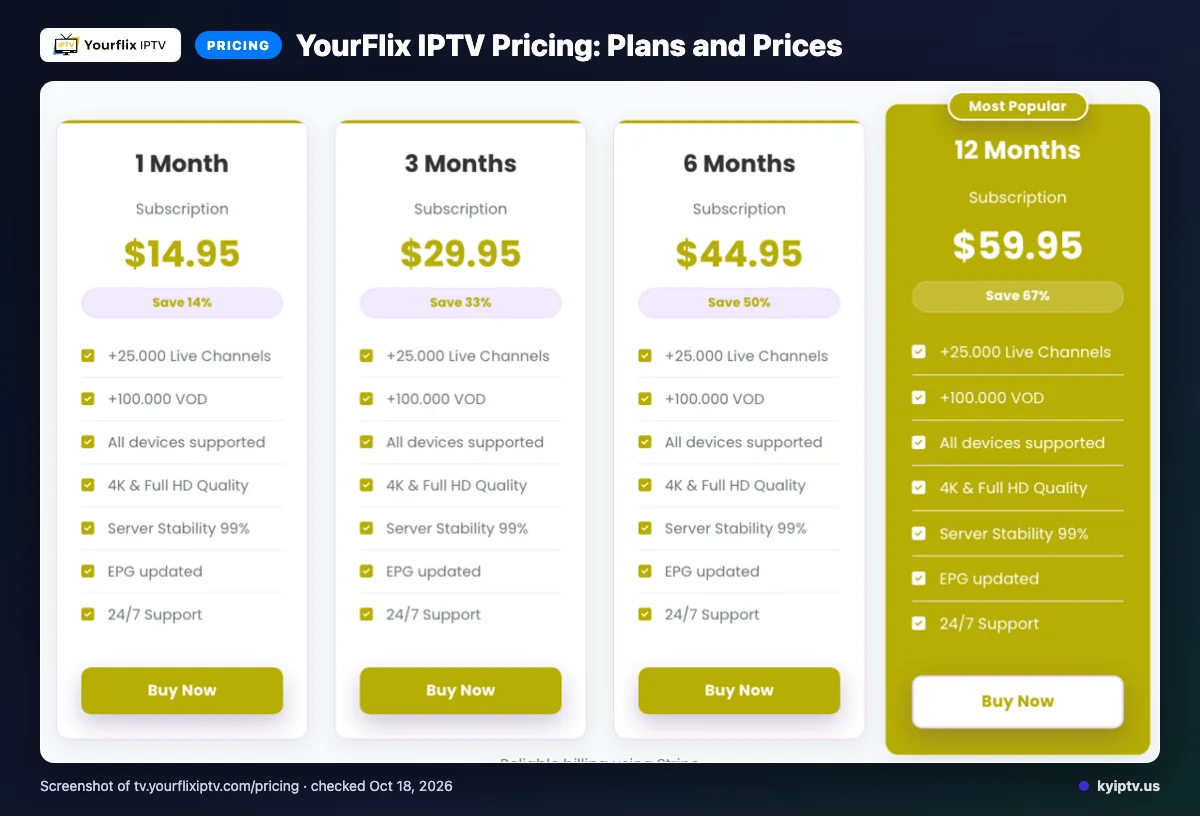
YourFlix lists four subscription terms, from one month to 12 months. The site uses dollar signs but does not explicitly name the currency; prices were checked October 10, 2026.
| Plan | Duration | Displayed price | Connections |
|---|---|---|---|
| 1 Month Subscription | 1 Month | $14.95 | 1 active connection per account |
| 3 Months Subscription | 3 Months | $29.95 | 1 active connection per account |
| 6 Months Subscription | 6 Months | $44.95 | 1 active connection per account |
| 12 Months Subscription | 12 Months | $59.95 | 1 active connection per account |
You can buy additional connections, but the website does not list their price.
Quick tip: Compare each plan’s duration as well as its displayed price, since the currency is not identified.
YourFlix IPTV trial, refund policy and payment options
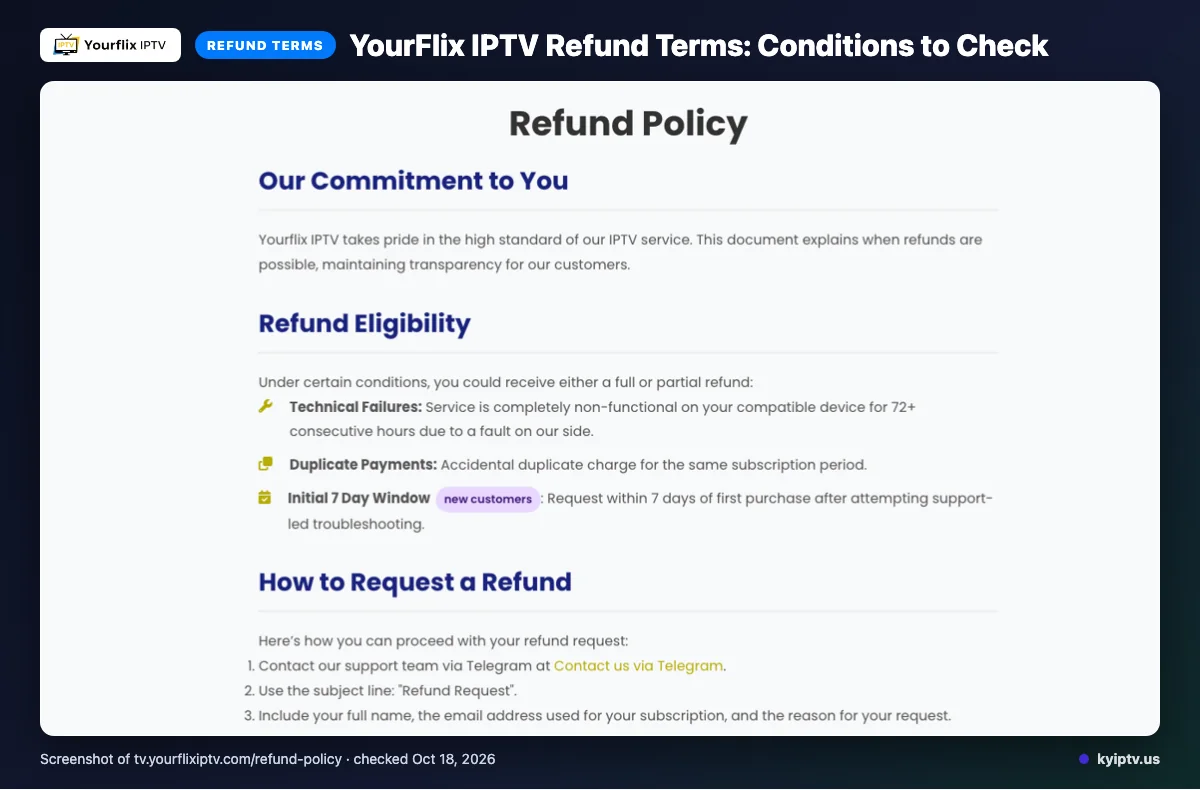
We did not find a free trial on the pages checked. Payment options listed are Visa, MasterCard, American Express, PayPal, and Stripe.
Refunds may apply if service is completely non-functional on a compatible device for 72+ consecutive hours because of a fault on YourFlix’s side, or if you made a duplicate payment. A new customer may also request a refund within seven days of the first purchase after trying support-led troubleshooting; send that request through Telegram.
Refunds exclude content dissatisfaction, slow or unstable internet, Terms of Service violations, and geo-blocking beyond YourFlix’s control. Renewal requests are handled case by case. Case review takes 0–3 business days; after approval, the refund is initiated the same day, and funds may take 5–10 business days to appear.
The pros and cons of YourFlix IPTV
Pros
- Large advertised channel and VOD totals.
- Several payment methods are listed.
Cons
- The channel and VOD figures conflict, as noted earlier.
- Catch-up is not listed.
- The standard plan has a single-connection limit.
Quick tip: Treat listed features as claims, not proof of performance. This review is based on website information; we did not perform a streaming test.
Is YourFlix IPTV safe and legal to use?
IPTV legality depends on content licensing and the laws where you live. This review does not determine whether YourFlix IPTV is lawful in your location.
Before paying, check the service’s licensing information and terms yourself on the YourFlix IPTV official site. Read the terms before entering payment details.
Use care with payment information and account credentials. No streaming test was performed, so this article cannot verify the service’s performance or safety.
Getting started: how to sign up for YourFlix IPTV and set it up
Start by checking the plan, payment option, and device you intend to use. Then follow YourFlix’s current purchase and setup instructions.
Before you start:
- A device from a category listed by YourFlix
- Your chosen plan
- A listed payment option
- Review the plans and terms on the YourFlix official site, then follow its current purchase instructions.
- After purchase, use the account or access instructions provided by the service.
- If it suits your device, install IPTV Smarters and follow YourFlix’s setup instructions.
Quick tip: Before contacting support, confirm you selected the intended plan and followed the service’s own setup instructions.
KY IPTV vs YourFlix IPTV: side by side
Compare plan terms, trial and device fit before you switch. YourFlix details below were checked October 10, 2026; its site uses dollar signs but does not explicitly name the currency.
| Item | KY IPTV | YourFlix IPTV |
|---|---|---|
| Plans | 1 month: $14.95; 3 months: $29.95; 6 months: $39.95; 12 months: $59.95; 24 months: $99.95. | 1 Month Subscription — 1 Month — $14.95; 3 Months Subscription — 3 Months — $29.95; 6 Months Subscription — 6 Months — $44.95; 12 Months Subscription — 12 Months — $59.95. Each allows 1 active connection per account. Additional connections can be bought; the website does not list their price. |
| Trial | 24-hour trial. | We did not find a free trial on the pages checked. |
| Refund | 7-day refund policy. | Stated grounds include qualifying technical failure, duplicate payment, or a new customer’s request within seven days after support-led troubleshooting. Exclusions include dissatisfaction, internet issues, terms violations and external geo-blocking. Renewal requests are handled case by case. Request through Telegram; review takes 0–3 business days, and approved refunds are initiated the same day, with funds taking 5–10 business days to appear. |
| Devices | Fire TV, Android and Google TV, Samsung and LG TVs, Apple devices, Roku, Xbox, PlayStation, Windows and Mac. | Smart TVs, Android, iOS, Firestick, Android boxes, MAG devices and PC. |
| Payment | Card via Binance gift card, Cash App, or BTC/USDT. | Visa, MasterCard, American Express, PayPal and Stripe. |
For YourFlix’s current terms, visit the YourFlix website. We invite you to compare the options and try KY IPTV with a 24-hour trial.
Is YourFlix IPTV right for you? Who should pick it and who should look elsewhere
YourFlix IPTV may fit viewers comparing regional options; KY IPTV is another service to consider. Its website describes an offer of live TV and VOD across the USA, UK, Canada, Europe, Asia, and MENA.
Regional plans are mentioned for the USA, Canada, Europe, and MENA. Consider it if those regions align with the programming you want. Look elsewhere or gather more details if you cannot confirm that fit.
Quick tip: Compare the regions listed with the programming you personally want before choosing a plan.
New to KY IPTV? See the setup guide, compare plans and prices, or check the channel list.
Frequently Asked Questions
What to check before subscribing
Review YourFlix’s current plan and terms before checkout. The standard subscription allows one active connection, and refunds depend on the conditions listed by the service.
Want to compare another option? Start the free 24-hour trial with KY IPTV.