
Disclosure: KY IPTV sells its own IPTV service, and KY IPTV and YourPrimeTV share common ownership. Everything below comes from YourPrimeTV’s own website, read on October 12, 2026; no streaming tests were run.
This yourprimetv review finds four listed plans, priced from $14.95 to $59.95, each for one device at a time. The site names supported devices and apps, but leaves some details unclear.
Compare the connection limit, refund conditions, and device setup before subscribing. If you are weighing another option, KY IPTV lists plans for the devices you already own.
YourPrimeTV at a glance
YourPrimeTV presents itself as an IPTV service for viewers seeking programming across multiple regions. Its website claims coverage in 100+ countries and names North America, Europe, the Middle East, Asia, Africa, and Latin America. It also lists France, the United Kingdom, Turkey, Greece, Belgium, the Netherlands, the USA, India, Canada, and Germany. The site refers to Arabic and Pakistani channel lineups. This is a website-based review of its published claims, not a streaming test.
Quick tip: Compare the listed regions and language references with the programming you want before choosing a plan.
What’s included with YourPrimeTV
YourPrimeTV lists a Live EPG TV Guide, but catch-up is not listed on its website. Refer to the earlier summary for its channel, VOD, and uptime figures.
Listed quality labels include 4K Ultra HD, 4K, Full HD, FHD, HD, 1080p, and standard definition. Devices named include Firestick and Amazon Fire TV Stick, Android boxes and TV boxes, Samsung, LG, and Sony Smart TVs, LG WebOS, iPhones, and iPads. Listed apps are TiviMate, IPTV Smarters Pro, Xtream UI, Perfect Player, VLC, and GSE IPTV.
The site advertises a “Zero-Buffer Streaming Engine,” anti-freeze technology, edge servers, load balancing, adaptive routing, and backup feeds. Treat quality and performance wording as website claims, not a guarantee of what your connection will deliver.
How much does YourPrimeTV cost? Plans and prices
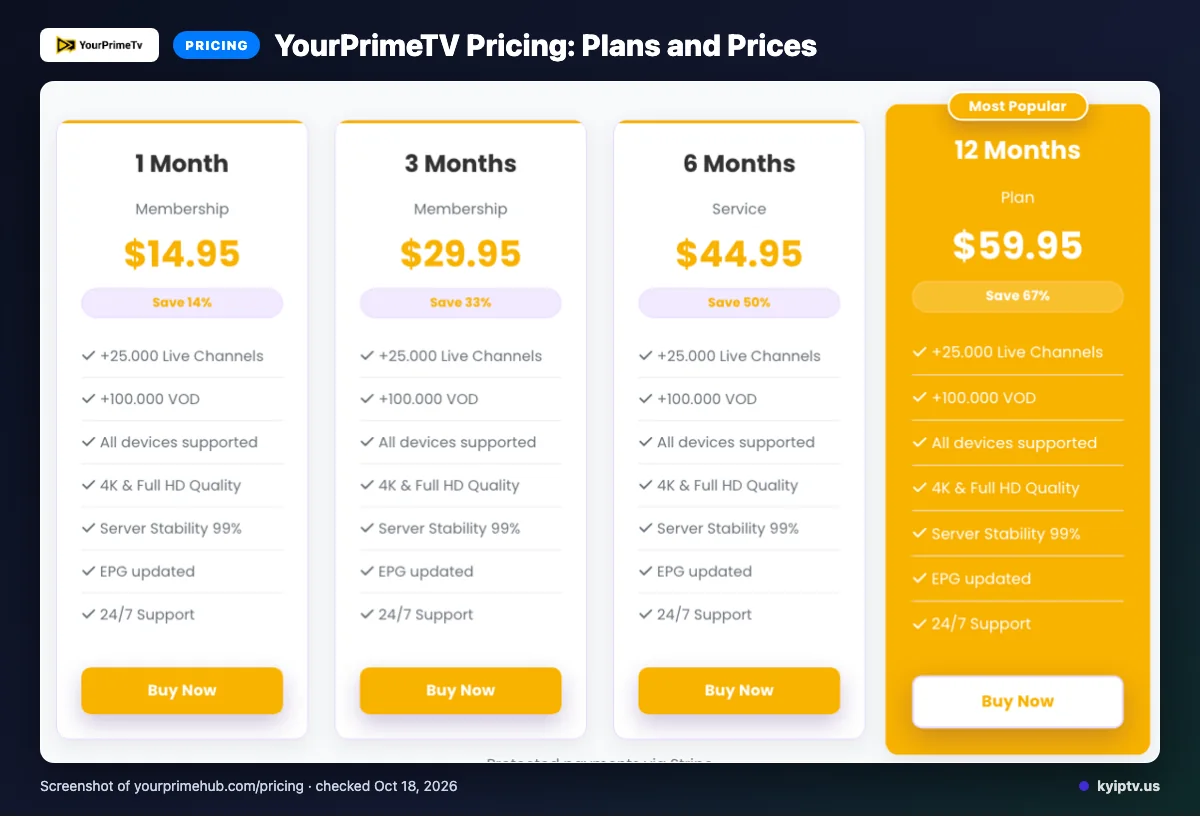
YourPrimeTV lists four plans, from $14.95 for one month to $59.95 for 12 months. The listed plans allow one device at the same time.
Prices checked: 2026-10-12.
| Plan | Duration | Price | Simultaneous connections |
|---|---|---|---|
| Starter Package | 1 Month | $14.95 | 1 device at the same time |
| Annual Package | 12 Months | $59.95 | 1 device at the same time |
| Half-Year Package | 6 Months | $44.95 | 1 device at the same time |
| Quarterly Package | 3 Months | $29.95 | 1 device at the same time |
Prices use a dollar sign, but the site does not explicitly identify the currency.
Quick tip: Use the listed plan rows rather than the pricing-page headline when comparing the stated starting price.
YourPrimeTV trial, refund policy and payment options
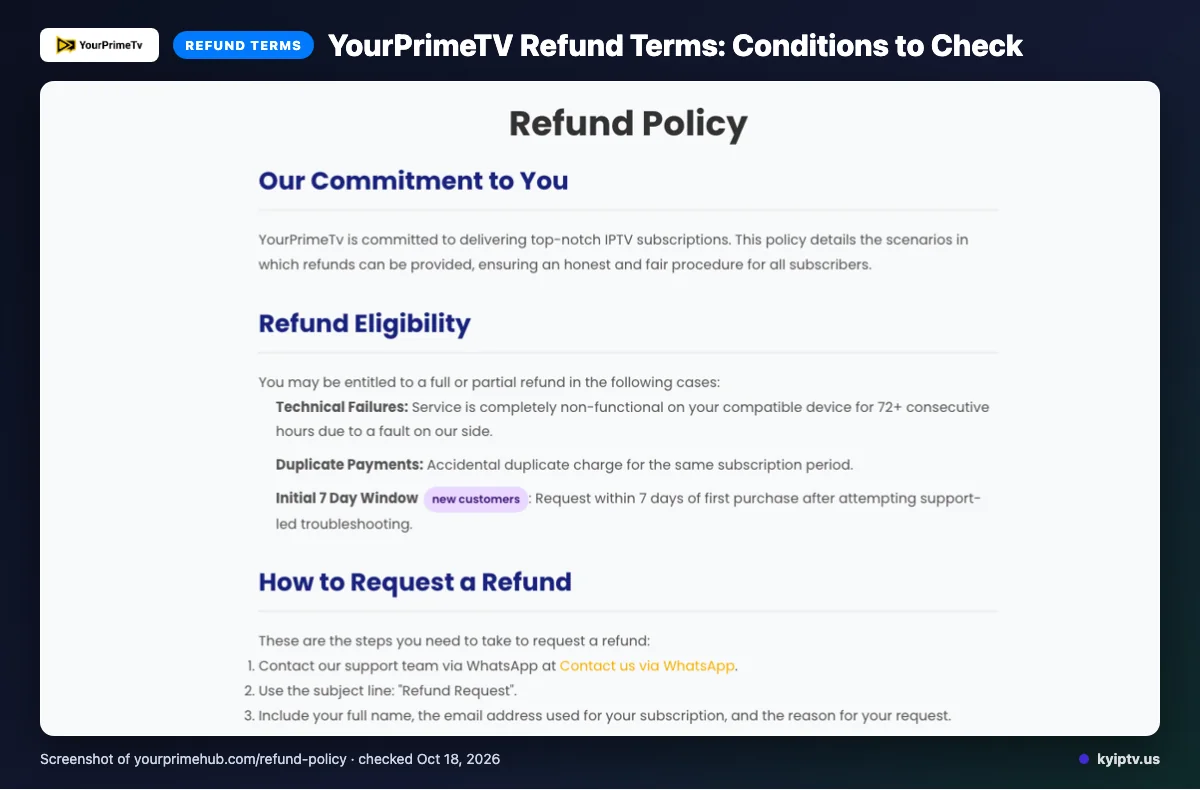
A reviewer wrote, “Began with a 1-month trial,” but the site states no trial offer or terms. Refunds may be available under specific conditions; save purchase and support records if you request one.
Eligible cases include service completely failing on a compatible device for 72+ consecutive hours due to a provider-side fault, duplicate payments, or a first-purchase request within seven days after support-led troubleshooting. The site excludes dissatisfaction with channels or content, slow or unstable internet, Terms of Service violations, and geo-blocking beyond the provider’s control. After seven days, refunds for changed decisions are typically not offered; renewal requests are reviewed separately.
Approved refunds are initiated the same day, but funds may take 5–10 business days to appear. Listed payment methods are Visa, MasterCard, American Express, PayPal, and Crypto.
The pros and cons of YourPrimeTV
YourPrimeTV’s listed details make it possible to compare plan terms, payment methods, and named devices. The main drawback here is uneven clarity across some website claims.
Pros
- Listed plan durations span 1, 3, 6, and 12 months.
- Named devices include Firestick, Android boxes, Samsung, LG, and Sony Smart TVs, iPhones, and iPads.
- Plans list a Live EPG TV Guide, with no contracts or hidden activation charges stated.
Cons
- Catch-up is not listed on the website, and trial terms are not stated.
- As noted above, conflicting VOD counts, uptime figures, and the pricing headline create clarity issues.
Quick tip: Separate listed features from performance claims when weighing the options.
Is YourPrimeTV safe and legal to use?
IPTV legality depends on content licensing and the laws where you live. The supplied website information does not establish YourPrimeTV’s licensing details, so it is not enough to determine whether the service is lawful in your location.
Look for clear licensing information before paying for access to content. Review the provider’s stated terms and consider local rules before subscribing. The supplied information also does not establish whether the service has undergone independent security verification.
Getting started: how to sign up for YourPrimeTV and set it up
Choose a plan duration, then use the official website’s sign-up flow to subscribe. After subscribing, follow the provider’s instructions for a device or app listed on its site; the site says setup takes less than five minutes.
Before you start: Pick the device you plan to use and keep the provider’s setup instructions available.
- Your chosen device
- The provider’s setup instructions
- Review the listed plans and choose the duration that fits your needs.
- Open the official website and follow its sign-up flow.
- After subscribing, use the provider’s instructions to set up the device or app.
- Open the Live EPG TV Guide to find programming.
KY IPTV vs YourPrimeTV: side by side
Compare the device you plan to use and the full terms, not just the shortest plan price. Similar prices do not mean matching terms or content.
| Item | KY IPTV | YourPrimeTV |
|---|---|---|
| Plans | One connection: 1 month $14.95; 3 months $29.95; 6 months $39.95; 12 months $59.95; 24 months $99.95. | See the plans section above. |
| Trial | 24-hour trial. | See the trial section above. |
| Refund | 7-day refund period. | See the refund section above. |
| Devices | Fire TV, Android and Google TV, Samsung and LG TVs, Apple devices, Roku, Xbox, PlayStation, Windows and Mac. | Firestick, Android boxes, Samsung, LG and Sony TVs, iPhone and iPad. |
Is YourPrimeTV right for you? Who should pick it and who should look elsewhere
YourPrimeTV may suit you if your device appears in its list and you accept the stated plan and refund terms. Choose based on what the site spells out, not assumptions about details it leaves unclear.
Look elsewhere if a clearly stated trial, catch-up details, or unambiguous VOD information is essential before paying. Those points may matter if you need firm answers before switching from cable.
If you want to compare another option, we invite you to try KY IPTV’s 24-hour trial before choosing.
New to KY IPTV? See the setup guide, compare plans and prices, or check the channel list.
Frequently Asked Questions
Does YourPrimeTV list a second-device connection option?
Yes. The standard plan lists one device at the same time, while the site’s FAQ says you can add a second connection for $10 per year. It also mentions bundles of three to five connections at lower rates. The available details do not specify those bundle prices, so confirm the full terms before paying.
Does YourPrimeTV list channels by country?
YourPrimeTV names countries and regions, but we did not find a complete country-by-country channel directory on the pages checked.
Which YourPrimeTV apps appear on its website?
YourPrimeTV also names Firestick, Android boxes, Samsung and LG Smart TVs, Sony Smart TVs, iPhones, and iPads as devices. Match the app and device details to your setup before subscribing.
Does YourPrimeTV state how often its EPG updates?
The site says its plans include a Live EPG TV Guide and describes the guide as updated. We did not find a stated update schedule on the pages checked. If a particular program listing matters to you, ask support how the guide handles schedule changes before you buy.
Can I use YourPrimeTV on an iPhone or iPad?
YourPrimeTV lists iPhones and iPads among its supported devices. Its named apps include GSE IPTV, IPTV Smarters Pro, and other players, but the pages checked do not specify which app to use on each Apple device. Follow the provider’s setup instructions for your device before subscribing.
Check the terms before you subscribe
YourPrimeTV lists four plan lengths, one simultaneous device per standard plan, and specific refund conditions. Confirm the connection option, device setup, and refund terms that apply to your purchase before paying.
We invite you to start the free 24-hour trial from KY IPTV.